Blogs
10 Key Lessons CIOs learned in 2025
November 19, 2025
Cisco Acquires NeuralFabric to Boost Generative AI Strategy
November 24, 2025
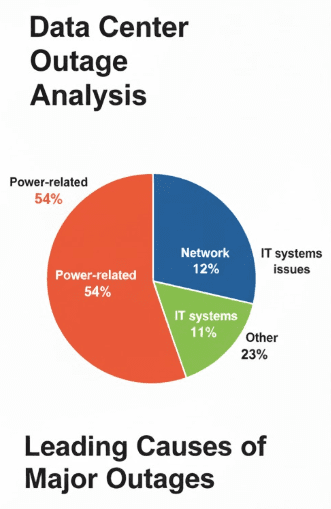
Power-related issues remain the leading cause of major data center outages, responsible for 54% of cases according to Uptime Institute’s 7th annual outage analysis report, while network and IT systems issues account for 12% and 11%, respectively. Notably, networking/connectivity problems contribute to 30% of end-to-end IT service outages.
Despite an increasingly volatile risk environment—including power grid strain, extreme weather and third-party failures—the frequency of outages is declining, with 53% of operators reporting downtime in the past three years in 2024, compared to 78% in 2020. Uptime attributes this improvement to better operational resilience amid rising external threats.
In this article, you will learn about nine common causes of network outages according to uptime institute’s 7th annual network outage analysis report.
Table of Contents
9 Common Causes of Network Outages
Here are 9 common causes of network outages according to Uptime Institute’s 7th annual network outage analysis report.
1. Configuration/Change Management Failure (50%)
One of the leading causes of network outages, configuration or change management failure, accounts for half of all incidents. These failures typically occur when network administrators implement changes—such as routing adjustments, firmware updates, or security policy modifications—without sufficient testing or oversight.
Even minor misconfigurations can have cascading effects across complex infrastructure, disrupting connectivity or causing critical services to go offline. In many cases, these issues stem from a lack of automation or inadequate documentation, making rollbacks difficult. To mitigate these risks, organizations must enforce rigorous change management protocols, including pre-deployment validation, peer review processes, and rollback plans.
2. Third-Party Network Provider Failure (34%)
Outsourcing network services to third-party providers is common, especially for cloud connectivity, broadband, and telecommunications. However, this reliance introduces dependencies that are outside an organization’s direct control. A failure on the provider’s end—whether due to their internal outages, routing mishaps, or equipment failures—can significantly impact multiple clients simultaneously.
When such incidents occur, affected businesses often experience delayed resolutions due to the provider’s internal processes and lack of visibility into their systems. Establishing service-level agreements (SLAs), ensuring redundancy across providers, and closely monitoring provider performance are critical steps for risk mitigation.
3. Hardware Failure (31%)
Despite advancements in reliability, hardware components such as routers, switches, firewalls, and servers remain vulnerable to failure due to age, overheating, power surges, or manufacturing defects. When critical components go down, especially in the absence of failover mechanisms, networks can experience complete blackouts or severely degraded performance.
Preventive maintenance, real-time monitoring of device health, and deploying high-availability architectures with built-in redundancy can help organizations avoid single points of failure and respond quickly to hardware-related issues.
4. Firmware/Software Error (26%)
Firmware and software bugs can introduce instability, security vulnerabilities, and incompatibilities that disrupt normal network operations. Sometimes, even official updates from trusted vendors can inadvertently cause issues when deployed without sufficient compatibility testing.
These problems may lead to abnormal routing behavior, dropped packets, or total service outages. Ensuring robust software lifecycle management—including staged rollouts, thorough testing in lab environments, and the use of version control and update logs—is essential to minimize risks associated with software-induced outages.
5. Line Breakages (17%)
Physical line breakages—often involving fiber optic or copper cabling—can disrupt connectivity, particularly in regions where infrastructure is concentrated or poorly maintained. These breaks may result from construction activities, vehicular accidents, natural wear, or even rodent damage. Since many enterprise networks rely on leased lines or dedicated circuits, a single cut in a critical path can render services unavailable until physical repairs are made. Geographic diversity in network design, including using multiple pathways and implementing self-healing topologies, can reduce the impact of line breakages.
6. Malicious Cyber Attack (17%)
Cyberattacks aimed at network infrastructure—such as Distributed Denial-of-Service (DDoS) attacks, ransomware infections, or exploitation of zero-day vulnerabilities—can result in extensive downtime and data loss. Attackers may target DNS servers, hijack routing protocols, or flood systems with malicious traffic to overwhelm them.
These threats are not only technical but also strategic, as attackers increasingly focus on high-value infrastructure. To defend against such incidents, organizations must adopt a layered cybersecurity posture, including firewalls, intrusion detection systems (IDS), continuous monitoring, threat intelligence feeds, and coordinated incident response plans.
7. Network Overload/Congestion Failure (13%)
As bandwidth demands surge due to streaming, remote work, cloud computing, and IoT devices, networks can become overwhelmed if not properly scaled. Congestion leads to high latency, packet loss, and timeouts, especially during peak usage periods.
Without adequate traffic management and load balancing, essential services can be throttled or brought down entirely. Effective capacity planning, prioritization of critical traffic through Quality of Service (QoS) protocols, and traffic shaping techniques are key to preventing overload-induced outages.
8. Corrupted Firewall/Routing Tables Issues (8%)
Routing table corruption or misconfigured firewall rules can isolate entire segments of a network or block legitimate traffic, leading to inaccessible applications or communication failures between systems. Such issues can arise from faulty updates, manual configuration errors, or unintended consequences of security policies. When core routing tables are affected, recovery often requires manual intervention and careful analysis to restore proper traffic flows. Using automated configuration validation, backup routing tables, and continuous monitoring tools helps to identify anomalies quickly and prevent prolonged outages.
9. Weather-Related Incident (7%)
Extreme weather events—such as floods, lightning strikes, hurricanes, and snowstorms—can physically damage networking equipment, power supplies, or infrastructure housed in data centers. In regions prone to severe weather, such incidents can cause prolonged outages, especially if access to the affected site is hindered or backup systems fail. To build resilience, organizations must adopt weather-hardened infrastructure, maintain remote management capabilities, and ensure power redundancy through uninterruptible power supplies (UPS) and generators.
Which of these causes of network outages bothered you the most? Share it with us in the comments section below.

Featured Post

5 Common Negative Consequences of Downtime For Businesses
A recent survey conducted by Cradlepoint, a subsidiary of Ericsson, revealed significant reliability issues in wired network connectivity for U.S. businesses, with nearly 90% of respondents […]

Sarmad Hasan
September 30, 2025

WHOIS Lookup: Everything You Need To Know
WHOIS, a portmanteau of “who is,” is a protocol used to query databases that store registration information about domain names and IP addresses. The WHOIS lookup […]

Hostnoc Editorial
January 5, 2024
How To Fix 502 Bad Gateway Errors?
A 502 Bad Gateway error is an HTTP status code that indicates that a server is unable to process a request sent by a client. This […]
Sarmad Hasan
January 26, 2023