Blogs

Cisco Expands Quantum Networking Portfolio with New Software Prototypes
October 3, 2025
GoDaddy Alternatives: 10 Options That Are Worth Considering
October 6, 2025
In online gaming, players and communities increasingly rely on dedicated gaming servers to host multiplayer sessions. These machines offer powerful performance, high uptime and granular control, making them the go-to solution for serious gamers, content creators and online communities alike.
Table of Contents
- What Is a Dedicated Gaming Server?
- How Do Dedicated Game Servers Work?
- Benefits of Dedicated Gaming Servers:
- Why Do Gamers Use Dedicated Servers?
- Understanding Dedicated Gaming Server Specs
- How Much Does a Game Server Cost?
- Challenges of Running a Dedicated Gaming Server
- Pros and Cons of a Dedicated Game Server
- How to Set Up a Gaming Server? A Step-by-Step Guide
- Who Should Use a Dedicated Game Server?
- Popular Games That Use Dedicated Servers
- Conclusion
What Is a Dedicated Gaming Server?
A dedicated gaming server is a stand-alone, always-on computer (typically in a data center) running game server software 24/7. Unlike hosting games on your personal PC through peer-to-peer connections, dedicated servers are optimized specifically to handle multiplayer game logic, physics, player communications and secure resource management. They deliver superior uptime, consistency and performance.
How Do Dedicated Game Servers Work?
Here is how dedicated game servers work.
- Provisioning
Choose a hosting provider or self-host server hardware. Consider CPU, memory, solid state drive, network and data-center location. - Setup
Install your preferred operating system (Linux is common, though Windows is required for some games) followed by necessary dependencies such as Java for Minecraft, .NET for Rust, container tools if using Docker. - Install Server Software
Download official server files for your game. - Configure Network
Forward required ports, set firewall rules and ensure DDoS protection and port routing are active. - DNS and Hosting
For ease of access, set up a custom subdomain and point it to the server’s IP. Using the best DNS server for gaming will optimize lookup times and enhance connectivity. - Launch and Monitor
Start the server via terminal or control panel. Monitor performance using tools like htop, glances, or hosted dashboards. Set up fail-safe scripts for auto-restarts and backups.
Benefits of Dedicated Gaming Servers:
Here are some of the benefits of dedicated gaming servers.
- No background processes or user activity affecting performance
- Greater network stability and ping reliability
- Complete customization (mods, rulesets, maps)
- Scalability for large groups, clans or competitive matches
Why Do Gamers Use Dedicated Servers?
Here are some of the reasons why gamers use dedicated servers.
Performance and Low Latency
Unlike peer-hosted sessions that depend on an individual player’s hardware and connection, dedicated servers offer dedicated CPU cycles, memory and network bandwidth, resulting in consistently low ping and smooth gameplay.
Network Stability
With always-on uptime and powerful DDoS protection, dedicated servers virtually eliminate disconnects and lag spikes during peak gameplay times.
Customization
Administrators can install mods, tweak game rules, set timers, adjust difficulty or control world generation to create unique experiences, which is not possible on default peer-hosted setups.
Scalability
From ten-player sessions to large-scale community events, dedicated servers support bigger player counts without compromising stability.
Understanding Dedicated Gaming Server Specs
Choosing the right specs is essential to ensure smooth gameplay.
Here are some of the factors you should consider:
CPU
- Focus on single-core performance (games often are not optimized for many cores).
- For most sessions (20–30 players), modern Intel i5/i7 or AMD Ryzen 5/7 CPUs are excellent.
RAM
- Depending on the game and mod load, expect to allocate:
- 8–16 GB for small groups or lightweight titles
- 16–32 GB+ for larger communities, modded servers or games like ARMA 3
Storage
- SSD/NVMe is a must to support fast world loading, chunk generation and save routines.
- For heavy mod usage or map-heavy games, 500 GB+ ensures longevity.
Network
- 1 Gbps Ethernet with unmetered bandwidth is ideal. Look for sub-30 ms latency from your target player base.
How Much Does a Game Server Cost?
Costs vary widely depending on provider quality and specs:
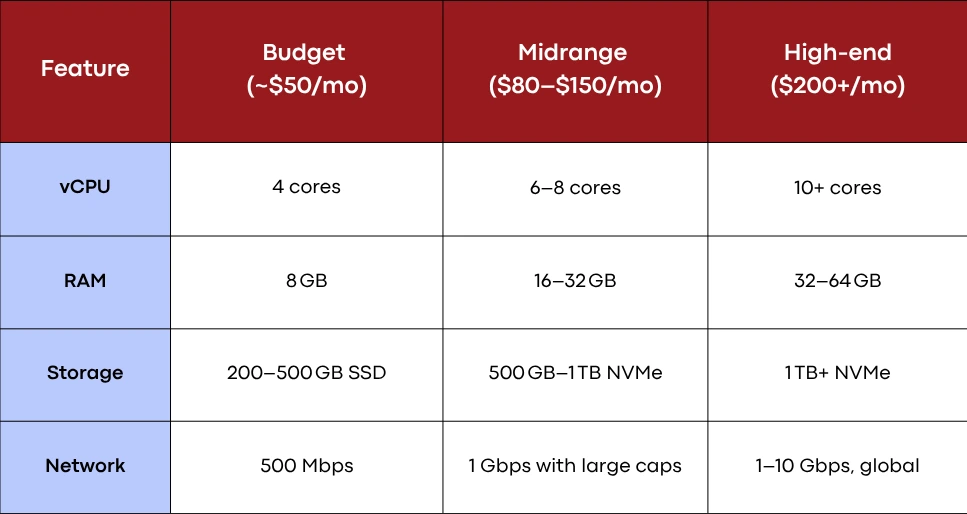
Add-ons like DDoS protection, auto-backup, 24/7 support and premium routing can affect price. Expect a good midrange server to cost $100–$150 per month with premium packages reaching $200+. Don’t forget optional one-time setup and licensing fees for control panels.
Challenges of Running a Dedicated Gaming Server
Here are some of the challenges that you could encounter when running a dedicated gaming server.
Initial Setup Complexity
Installing and configuring servers requires some technical skill but using Docker or preconfigured control panels can simplify the process.
Security and Maintenance
You must manage operating system updates, patches and firewall rules along with DDoS protection. Neglecting these areas can lead to vulnerabilities or downtime.
Financial Commitment
Running a reliable server involves recurring costs for hosting, backups, bandwidth and optional enhancements.
Responsibility for Uptime
Unlike peer-hosted sessions that end with your PC, dedicated servers must be continually monitored to ensure high availability and success during events or matches.
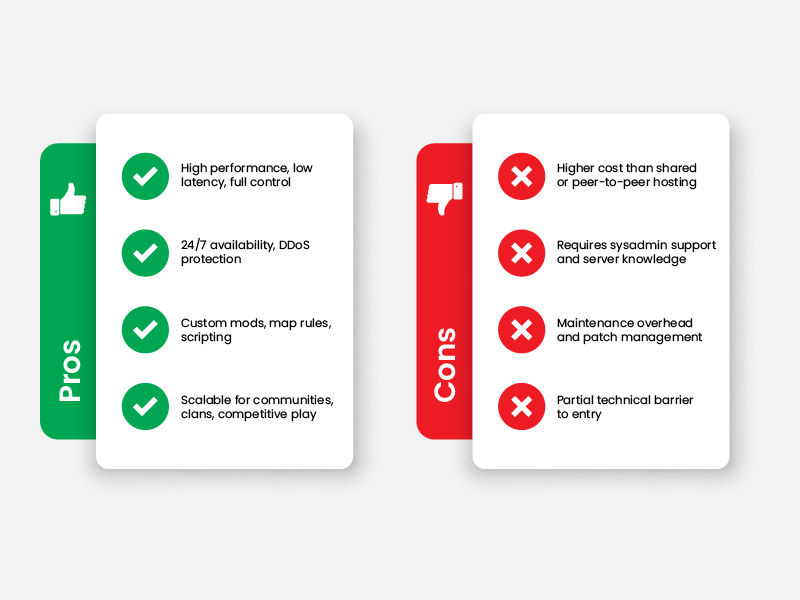
Pros and Cons of a Dedicated Game Server
Here are some of the pros and cons of dedicated game servers.
How to Set Up a Gaming Server? A Step-by-Step Guide
Follow this step by step guide to setup your gaming server.
- Select Hosting and Choose a Plan
Prioritize CPU single-thread speed, ample RAM, NVMe storage and strong network specs. - Choose Operating System
Linux is efficient but Windows may be required for certain games (DEPENDS on game’s supported operating system). - Install Prerequisites
Tools like screen or tmux, dependencies (Java, .NET Core), Docker and zip/unzip utilities. - Download and Install Game Software
Follow specific setup guides within our site such as Stardew Valley Server or Rust server hosting.
- Firewall and Port Forwarding
Open the game’s default ports (UDP/TCP). Apply firewall rules for security. - Custom DNS Setup
Configure a subdomain (e.g., play.yourdomain.com) via your DNS provider for player convenience. - Launch and Automate
Use scripts or control panel tools for auto-launch, auto-restart, backup and alert notifications. - Monitoring
Run htop, netstat or provider dashboards. Set up automated alerts (email/Discord) to know if something goes offline. - Add Mods and Plugins
Install mods carefully. For Minecraft, use server software like Spigot or Paper. For ARMA, configure addons. Check version compatibility and always back up before applying mods.
Who Should Use a Dedicated Game Server?
If you have:
- Competitive Teams or are into Esports
You need reliable uptime, consistent rule sets and lag-free matches. - Communities and Clans
With 10+ players, dedicated servers scale better than shared hosting. - Content Creators and Streamers
Custom maps, mod packs and control over the game world enhance the viewer ‘s experience. - Game Admins and Developers
For beta testing, event hosting or internal dev builds.
Popular Games That Use Dedicated Servers
Below is a visual hub of our in-house setup guides. Click any link to dive deeper into server builds, configurations, scripts and community tips.
- ARK Dedicated Server
- PUBG Dedicated Server
- DayZ Server Hosting
- Project Zomboid Server
- Palworld Server Hosting
- Enshrouded Server Hosting
- Valheim Server Hosting
These guides will walk you through installation scripts, port configurations, performance optimizations and mod workflows, making your server setup crisp and efficient.
Conclusion
A dedicated gaming server delivers the best multiplayer experience thanks to low latency, full customization and strong performance to players who seek reliability and control. Whether you are hosting a small casual community or building a competitive environment, these servers offer unmatched flexibility. With the right specification, server provider and setup strategy, you are well on your way to running a powerful and smooth server environment.

Frequently Asked Questions About Gaming Server

Why should I choose a dedicated server over using my own computer?
Dedicated servers eliminate PC resource conflicts, offer far better uptime and prevent exposure of your home IP. They also remain online 24/7 and reduce performance impact on your primary gaming rig.
How does a dedicated game server improve my gaming experience?
You gain consistent low latency, near-zero lag, freedom from rollback events and complete customization via mods and configuration.
Can I host multiple games on a single dedicated server?
Yes, if your server has sufficient resources (multi-core CPU, 32+ GB RAM). Each game runs in its own instance or container on different ports or IP aliases.
Is a dedicated graphics card necessary?
No, unless you are running GPU-intensive physics, streaming or unique graphical mods. Most game servers rely solely on CPU, RAM, storage and network resources.
What are dedicated servers for games?
They are purpose-built servers that manage multiplayer sessions, handling physics, player connections, mods and persistent environments.
Do dedicated game servers need a GPU?
Standard gaming servers rely on computers and networking. GPU resources are rare and only useful for specialized use-cases like game streaming.
Should I get a dedicated IP for my Minecraft Server?
Yes it helps branding, ease-of-use, DNS management and gives your players a stable address (e.g. mc.yourdomain.com). Though optional, it makes your server look more professional.
Which DNS Server is better for gaming?
Fast public resolvers like Cloudflare (1.1.1.1), Google (8.8.8.8) or your hosting provider’s low-latency alternative help reduce lookup time and improve connection reliability.
What is the best CPU to use for a gaming server?
Focus on strong single-core performance. Current-gen Intel i5/i7 or AMD Ryzen 5/7 processors balance cost and performance, supporting most game server workloads at scale.

Featured Post

Dedicated Server With GPUs: The Ultimate Guide
There are various types of servers, each designed to cater to different workloads and use cases. Among these, dedicated server with GPU (Graphics Processing Unit) have […]

Sarmad Hasan
November 12, 2025
Server Deployment: The Ultimate Guide
Server deployment is the process of making an application, website, or system available for use by installing, configuring, and running it on a server (physical or […]
Sarmad Hasan
November 3, 2025
Server Network: The Ultimate Guide
A server network is the backbone of modern business IT infrastructure, enabling communication between different devices, services, and systems. Whether for a small business, an enterprise, […]
Sarmad Hasan
October 30, 2025