


If you are comparing n8n vs Make.com, you are choosing between two of the most popular workflow automation platforms on the market. Both help you connect apps and automate repetitive work without heavy coding, but they serve different audiences, budgets and use cases.
🔑 Key Takeaways
- Choose n8n if you need self-hosting, complete data ownership, advanced workflow logic, AI agents or developer flexibility.
- Choose Make.com if you prefer a polished visual builder with hundreds of ready-made integrations and minimal setup.
- n8n is open-source (fair-code), while Make.com is proprietary software as a service (SaaS).
- Make.com is easier for beginners, whereas n8n offers greater customization for technical users.
- n8n provides more flexibility for AI automation, API orchestration and custom scripting.
- Make.com excels in marketing automation, CRM synchronization and no-code business workflows.
Businesses are increasingly adopting workflow automation to eliminate repetitive tasks, connect applications and improve operational efficiency. While n8n and Make.com both let users build automated workflows without extensive coding, the right pick depends on your team’s skills and long-term goals.
This guide compares their architecture, pricing, integrations, AI capabilities, scalability, security and developer experience to help you choose the right platform.
☰ Table of Contents (click to expand)
- What is n8n?
- What is Make.com?
- n8n vs Make: Key Architectural Differences
- n8n vs Make.com: Feature Comparison
- n8n vs Make: Ease of Use
- Workflow Flexibility
- Integrations
- n8n vs Make for AI Automation
- Performance and Scalability
- n8n vs Make Pricing
- Security and Compliance
- Best Use Cases for n8n and Make.com
- n8n vs Make: Real-World Use Cases
- n8n vs Make Cost at Scale
- How to Migrate From Make.com to n8n
- What You Need to Host n8n
- n8n vs Make: Pros and Cons
- Conclusion: n8n vs Make, Which Is Better?
- n8n vs Make: Frequently Asked Questions
What is n8n?
n8n is an open-source workflow automation platform that connects applications, APIs, databases, AI models and internal systems through visual workflows. Unlike traditional no-code tools, n8n follows a fair-code licensing model, allowing organizations to self-host the platform while keeping full control over infrastructure and sensitive data. Learn more in our guide to what n8n hosting is.
Key Capabilities of n8n
- Self-hosting
- JavaScript and Python code nodes
- API integrations
- Webhooks
- AI workflow automation
- Human-in-the-loop workflows
- Conditional branching
- Error handling
- Database connectivity
n8n is especially popular among developers, startups, DevOps teams and AI builders.
What is Make.com?
Make.com (formerly Integromat) is a cloud-based visual automation platform designed primarily for business users. Its drag-and-drop scenario builder lets users automate tasks across hundreds of SaaS applications without writing code.
Popular Make.com Use Cases
- CRM automation
- Email marketing
- Ecommerce synchronization
- Social media publishing
- Customer support automation
- Data transformation
- Reporting workflows
Since everything runs in the cloud, users can start automating almost immediately without managing servers.
n8n vs Make: Key Architectural Differences
Before comparing features, it helps to understand how each platform is built, because architecture drives almost every other difference in the n8n vs Make comparison.
Where Your Workflows Run
Make.com is a multi-tenant SaaS platform. Every scenario runs on Make’s servers, and your data passes through their infrastructure. n8n can run in the same way through n8n Cloud, but it can also run on a server you own, inside your private network, close to your databases and internal tools.
How Workflows Are Modeled
Make uses scenarios made of modules, routers, iterators and aggregators. n8n uses workflows made of nodes that pass JSON items from one step to the next. Both are visual, but n8n’s item-based model and code nodes give developers finer control over data transformation.
How Each Platform Is Extended
Make is extended mainly through its app library and HTTP module. n8n can be extended with community nodes, custom-built nodes, JavaScript or Python code and sub-workflows, which makes it closer to a developer platform than a pure no-code tool.
These design choices explain why Make feels faster to start with, while n8n feels more powerful the further you push it.
n8n vs Make.com: Feature Comparison
| Feature | n8n | Make.com |
|---|---|---|
| Deployment | Cloud + Self-hosted | Cloud only |
| Open Source | ✅ Yes (Fair-code) | ❌ No |
| Visual Builder | ✅ Yes | ✅ Yes |
| Code Support | JavaScript & Python | Limited |
| AI Automation | Excellent | Good |
| Custom APIs | Excellent | Excellent |
| Workflow Complexity | Very High | Moderate |
| Learning Curve | Medium | Easy |
| Enterprise Security | Excellent | Good |
| Data Ownership | Full (Self-hosted) | Cloud managed |
n8n vs Make: Ease of Use
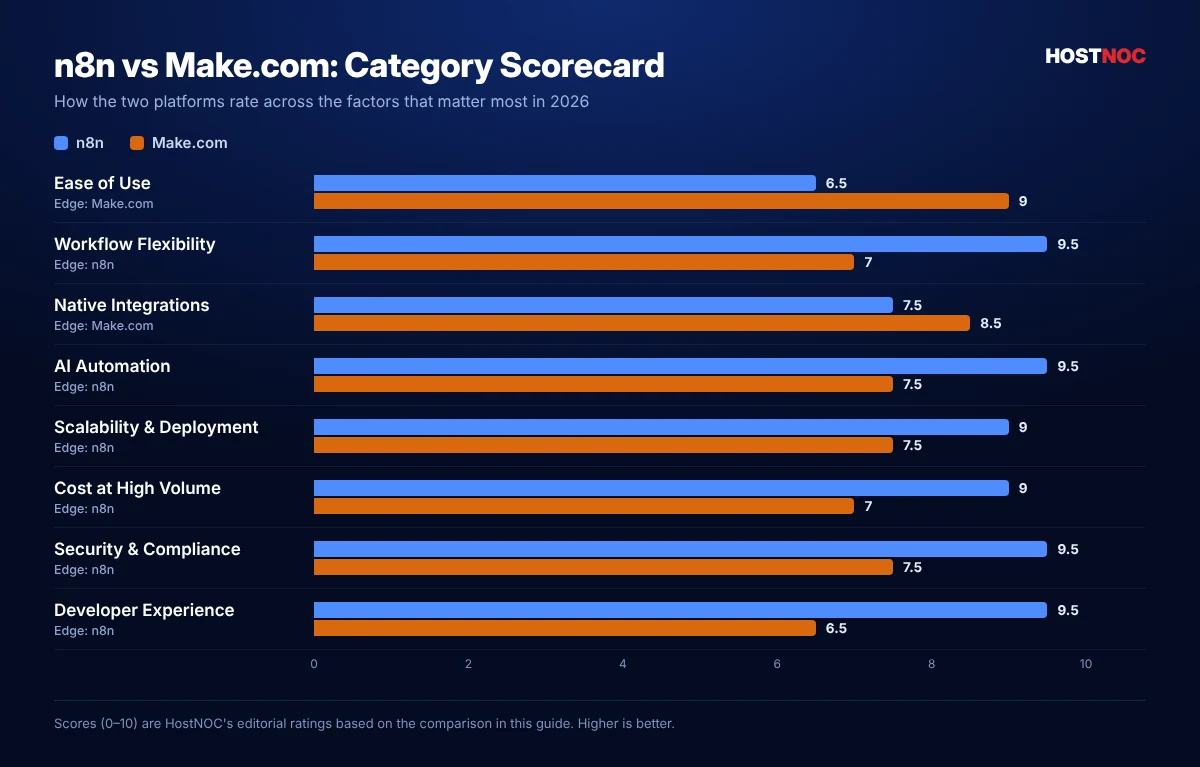
Make.com has one of the cleanest workflow builders available. Users drag modules onto a canvas, connect them visually and configure each step through intuitive forms. Its minimal learning curve makes it ideal for:
- Marketing teams
- Sales departments
- Agencies
- Non-technical business users
n8n also provides a visual workflow editor but includes significantly more advanced functionality. Features such as expressions, variables, loops, custom JavaScript, HTTP requests and function nodes make it more powerful, but also more complex for beginners.
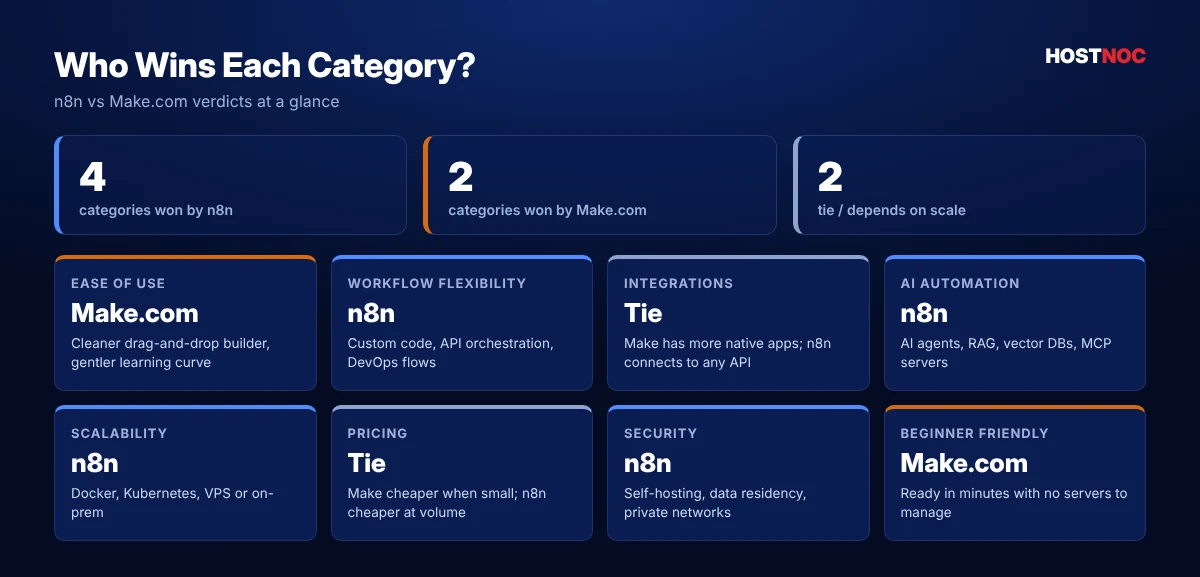
🏆Winner: Make.com
Workflow Flexibility
This is where n8n clearly stands out. Unlike Make.com, n8n lets developers build almost any workflow imaginable, including:
- Multi-step API orchestration
- AI agent pipelines
- Database automation
- Internal enterprise systems
- Kubernetes workflows
- GitHub automation
- DevOps processes
Developers can even execute custom JavaScript inside workflows, which dramatically expands what is possible. Make.com supports advanced scenarios but focuses more on business automation than software engineering workflows.
🏆Winner: n8n
Integrations
Both platforms integrate with hundreds of applications. Popular integrations include:
- Slack, Discord and Microsoft 365
- Google Workspace, Notion and Airtable
- Salesforce and HubSpot
- Shopify and Stripe
- OpenAI
- Trello and Dropbox
Make.com generally offers more native integrations out of the box. n8n compensates by letting users connect virtually any service through REST APIs, GraphQL, HTTP requests, webhooks and custom nodes. If an integration doesn’t exist, developers can build one.
🏆Winner: Tie
n8n vs Make for AI Automation
AI workflows have become one of the biggest differentiators between automation platforms. n8n has invested heavily in AI capabilities, and users can create workflows involving:
- AI agents
- Retrieval-Augmented Generation (RAG)
- OpenAI, Anthropic Claude and Google Gemini
- Vector databases
- LangChain
- MCP servers
- Human approval steps
This makes n8n particularly attractive for building AI assistants and autonomous workflows. Make.com supports AI integrations as well, but it focuses on connecting external AI services rather than building sophisticated AI orchestration pipelines.
🏆Winner: n8n
Make.com connects you to AI services. n8n lets you build the AI system itself — agents, memory, retrieval and human approvals in one workflow.
Performance and Scalability
n8n can be deployed almost anywhere, including:
- Docker
- Kubernetes
- AWS, Azure and Google Cloud
- VPS servers
- On-premise infrastructure
Organizations can scale workflows according to their own infrastructure requirements. Make.com scales automatically because it is fully managed, which suits businesses that don’t want to maintain servers. However, enterprises that need complete infrastructure control often choose n8n. If you plan to run n8n yourself, see our guide on how to deploy n8n on Linux.
🏆Winner: n8n
Scale n8n on Infrastructure You Control
Launch n8n on high-performance HostNOC servers with full root access, SSD storage and 24/7 support.
n8n vs Make Pricing
Pricing depends heavily on workflow volume.
n8n
- Free self-hosted version
- Predictable pricing
- Unlimited customization
- No infrastructure lock-in
n8n is ideal for organizations running thousands of workflow executions. Our breakdown of self-hosted vs cloud n8n explains which option costs less for your volume.
Make.com
- Generous free plan
- Easy onboarding
- No server maintenance
Make.com costs increase as you scale because pricing is based largely on automation operations. For small businesses, Make.com is often more economical. For larger automation workloads, self-hosted n8n can become significantly cheaper.
🏆Winner: Depends on scale
HostNOC Tip: Estimate your monthly operations first. Once you pass a few thousand runs a month, a self-hosted n8n server usually costs less than paying per operation.
Security and Compliance
Security is increasingly important when automating business processes. n8n offers:
- Self-hosting and private cloud deployment
- Data residency control
- Internal network access
- Enterprise authentication and security management
These capabilities make n8n suitable for organizations handling sensitive customer data. Make.com provides enterprise-grade cloud security but stores workflow executions within its managed infrastructure. Businesses with GDPR, HIPAA or internal compliance requirements may prefer n8n’s deployment flexibility.
🏆Winner: n8n
Best Use Cases for n8n and Make.com
| Choose n8n if you need… | Choose Make.com if you need… |
|---|---|
| AI agents | Marketing automation |
| Internal APIs | CRM synchronization |
| Self-hosting | Ecommerce automation |
| Enterprise integrations | No-code workflows |
| Developer workflows | Fast implementation |
| Custom scripting | SaaS integrations |
| Database automation | Business process automation |
| Infrastructure control | Easy onboarding |
| Large-scale workflow orchestration | A fully managed platform |
n8n vs Make: Real-World Use Cases
To make the n8n vs Make choice concrete, here is how each platform handles everyday automation scenarios.
| Scenario | Better Fit | Why |
|---|---|---|
| Post new blog articles to all social channels | Make.com | Ready-made modules and a visual scenario in minutes |
| AI agent that qualifies leads and updates the CRM | n8n | AI agent nodes, memory, tools and human approval |
| Sync ecommerce orders with accounting software | Make.com | Strong native integrations and data mapping |
| Internal API orchestration across microservices | n8n | HTTP nodes, custom code and private network access |
| Agency managing automations for many clients | Make.com | Shared, easy-to-read visual scenarios |
| Regulated data (GDPR, HIPAA) that must stay on-premise | n8n | Self-hosting with full data residency control |
| Very high execution volumes | n8n | Flat server cost instead of per-operation billing |
In short, Make.com shines when speed and simplicity matter, while n8n wins when workflows touch code, AI, private systems or very large volumes.
n8n vs Make Cost at Scale
Make.com charges by operations, meaning every module that runs counts toward your monthly quota. Self-hosted n8n has no execution-based billing at all; you pay only for the server. That difference becomes the deciding factor in many n8n vs Make evaluations.
| Monthly Volume | Make.com | Self-Hosted n8n |
|---|---|---|
| Low (a few thousand operations) | Free or entry plan is very affordable | Server cost may be higher than needed |
| Medium (tens of thousands) | Mid-tier plan, cost grows with each module | One small VPS handles it easily |
| High (hundreds of thousands+) | Higher tiers or enterprise pricing | Same flat server cost, scale with queue mode |
Check each vendor’s latest pricing before deciding, but the trend is consistent: the more operations you run, the more a self-hosted n8n server saves. Compare managed vs unmanaged VPS options to estimate your own costs.
How to Migrate From Make.com to n8n
- List your scenarios – note triggers, modules, routers and monthly operation counts.
- Start with high-cost scenarios – they deliver the fastest return on the migration effort.
- Deploy n8n – use a Linux VPS or managed n8n hosting with SSL, PostgreSQL and backups.
- Rebuild routers as IF/Switch nodes – Make routers map cleanly to n8n branching nodes.
- Test in parallel – run the n8n workflow alongside the Make scenario with real data.
- Cut over and monitor – disable the scenario, then watch n8n execution logs and add error workflows.
HostNOC Tip: Install n8n’s community nodes only from trusted sources and keep your n8n version updated to get the latest security fixes.
What You Need to Host n8n
If this n8n vs Make comparison points you toward n8n, plan your hosting early. A reliable production setup includes:
- A VPS or dedicated server sized for your workload (2 vCPU and 4 GB RAM is a comfortable starting point for most small teams)
- Docker or Docker Compose
- PostgreSQL for the database
- A domain with SSL for secure webhooks
- Automated backups
- Redis and queue mode when you need to scale
Follow our guide on how to install n8n on a VPS, and avoid these common n8n hosting mistakes.
n8n vs Make: Pros and Cons
n8n Pros and Cons
n8n Pros
- ✅ Open-source
- ✅ Self-hosted
- ✅ Excellent AI capabilities
- ✅ Advanced workflow logic
- ✅ Strong developer tools
- ✅ Highly customizable
n8n Cons
- ⚠️ Steeper learning curve
- ⚠️ Requires infrastructure for self-hosting
- ⚠️ Some advanced features require technical knowledge
The infrastructure hurdle is easy to remove with managed hosting. Here are the top benefits of managed n8n hosting.
Make.com Pros and Cons
Make.com Pros
- ✅ Extremely beginner-friendly
- ✅ Beautiful visual interface
- ✅ Large integration library
- ✅ Fast workflow creation
- ✅ Fully managed cloud platform
Make.com Cons
- ⚠️ No self-hosting
- ⚠️ Less customizable
- ⚠️ Costs can rise with high operation volumes
- ⚠️ Limited developer flexibility
Conclusion: n8n vs Make, Which Is Better?
The n8n vs Make choice depends on your technical expertise and business requirements. If your organization prioritizes flexibility, AI automation, infrastructure control and advanced workflow orchestration, n8n is the stronger platform. Its open-source foundation, self-hosting capabilities and developer-friendly features make it ideal for startups, engineering teams and enterprises building sophisticated automation systems.
On the other hand, if your primary goal is to automate everyday business processes quickly with minimal technical effort, Make.com delivers an excellent user experience. Its intuitive visual builder, extensive integration catalog and managed cloud environment make it a compelling choice for marketers, operations teams, agencies and small businesses.
A practical approach many teams take is to prototype quickly in Make.com, then move high-volume, data-sensitive or AI-heavy workflows to a self-hosted n8n server as their automation program matures. That way, you get fast results today and a scalable, cost-efficient foundation for tomorrow without locking your business into a single vendor.
Choose n8n for maximum flexibility and customization. Choose Make.com for speed, simplicity and ease of use.
Also weighing Zapier? Read our full n8n vs Zapier comparison to see how all three tools stack up.
Ready to Self-Host n8n?
Get a pre-configured n8n server with predictable pricing, no per-operation fees and expert support from HostNOC.
FAQs
n8n vs Make: Frequently Asked Questions
Quick answers to the questions people ask most.
Is n8n better than Make.com?
n8n is generally better for developers, AI workflows and organizations that require self-hosting or advanced customization. Make.com is better for users seeking a simple, no-code automation experience.
Is n8n completely free?
n8n offers a free self-hosted version. Paid cloud and enterprise plans are available for users who prefer managed hosting and additional features.
Can Make.com replace Zapier?
Yes. Make.com is often considered a more powerful alternative to Zapier, offering advanced workflow logic, data transformation and multi-step automations.
Which platform is better for AI automation?
n8n is widely regarded as the stronger choice for AI automation thanks to its support for AI agents, large language models, vector databases, custom code and complex orchestration workflows.
Is Make.com suitable for enterprises?
Yes. Make.com offers enterprise plans with security, governance and collaboration features. However, organizations that require complete control over infrastructure and data often prefer n8n.
Which platform has more integrations?
Make.com provides a larger library of native integrations. n8n, however, can connect to virtually any application through APIs, webhooks and custom nodes, making it highly extensible.
Can I use n8n and Make.com together?
Yes. Many teams keep simple marketing scenarios in Make.com and run complex, AI-driven or high-volume workflows in n8n. The two platforms can even trigger each other through webhooks, so you can migrate gradually instead of all at once.
Do I need coding skills to use n8n?
No. Most n8n workflows can be built visually without code. Coding skills simply unlock extra power, such as custom JavaScript or Python nodes, complex data transformation and building your own integrations.
What server do I need to self-host n8n?
For most small teams, a VPS with 2 vCPU and 4 GB RAM running Docker, PostgreSQL and SSL is a comfortable starting point. Larger workloads can scale up with queue mode, Redis and additional worker servers.
Which is easier for beginners?
Make.com has a more intuitive interface and a gentler learning curve, making it the better choice for users with little or no technical background.

Featured Post
n8n vs Zapier: Which One Should You Choose and Why?
n8n vs Zapier compared on ease of use, integrations, AI automation, pricing,...

10 Best n8n Hosting Providers in 2026
Compare the 10 best n8n hosting providers in 2026, from managed n8n...
Top 20 n8n Hosting Security Best Practices
20 proven n8n hosting security best practices covering HTTPS, authentication, secrets, Docker,...
Follow us on:


Get the Latest News & Deals
Sign up to receive the latest news, updates and special offers from HostNOC.
I'd like to receive: