


n8n hosting security is just as important as the workflows you build. Because n8n sits at the center of your business systems, holding API keys, OAuth tokens and database credentials, a single weak point in your hosting setup can expose every connected application.
🔑 Key Takeaways
- Secure your n8n deployment with layered defenses, including HTTPS, authentication, network isolation, encrypted secrets and regular updates.
- Protect sensitive workflow data with environment variables, secret managers, role-based access control (RBAC) and audit logging.
- Continuously monitor and maintain your infrastructure through backups, vulnerability scanning, log monitoring and disaster recovery planning.
As workflow automation becomes a core part of modern business, n8n has emerged as one of the most popular open-source automation platforms. Organizations use it to connect applications, automate repetitive tasks, synchronize data and build powerful workflows without extensive coding.
However, since n8n often connects to business-critical services such as GitHub, Slack, Google Workspace, Stripe, AWS, PostgreSQL, MySQL, your CRM and internal APIs, a compromised instance can expose credentials, customer data and sensitive business processes.
Whether you self-host n8n on Docker, Kubernetes, AWS EC2, Google Cloud, Microsoft Azure or a dedicated VPS, strong n8n hosting security should be your highest priority. In this guide, HostNOC covers the 20 most effective practices for keeping your automation environment secure, reliable and compliant.
☰ Table of Contents (click to expand)
- Why n8n Hosting Security Matters
- 20 n8n Hosting Security Best Practices
- 1. Always Use HTTPS
- 2. Keep n8n Updated
- 3. Protect the n8n Editor With Authentication
- 4. Restrict Network Access
- 5. Store Secrets Securely
- 6. Encrypt Credentials and Protect the Encryption Key
- 7. Secure Your Database
- 8. Follow Docker Security Best Practices
- 9. Harden Your Operating System
- 10. Implement Role-Based Access Control (RBAC)
- 11. Monitor Logs Continuously
- 12. Enable Automated Backups
- 13. Isolate Workflows and Environments
- 14. Secure API Endpoints and Webhooks
- 15. Protect Against Denial-of-Service (DoS) Attacks
- 16. Secure Third-Party Integrations
- 17. Implement Security Monitoring
- 18. Maintain Compliance
- 19. Perform Regular Security Audits
- 20. Create an Incident Response Plan
- Where to Start: Prioritizing n8n Hosting Security
- n8n Hosting Security Checklist
- Key n8n Security Settings and Environment Variables
- Common n8n Hosting Security Mistakes
- Self-Hosted vs Managed n8n Hosting Security
- Conclusion
- n8n Hosting Security: Frequently Asked Questions
Why n8n Hosting Security Matters
Unlike most applications, n8n acts as a central integration hub. A single workflow might have access to:
- Payment gateways
- Customer databases
- Email services
- Cloud storage
- Source code repositories
- Internal APIs
- AI platforms
- HR systems
If attackers gain access to your n8n instance, they can inherit permissions to every connected service. That is why n8n hosting security is about more than the server itself: it protects your entire technology stack.
Your n8n server holds the keys to every app it connects to. Secure it like you would secure your password manager.
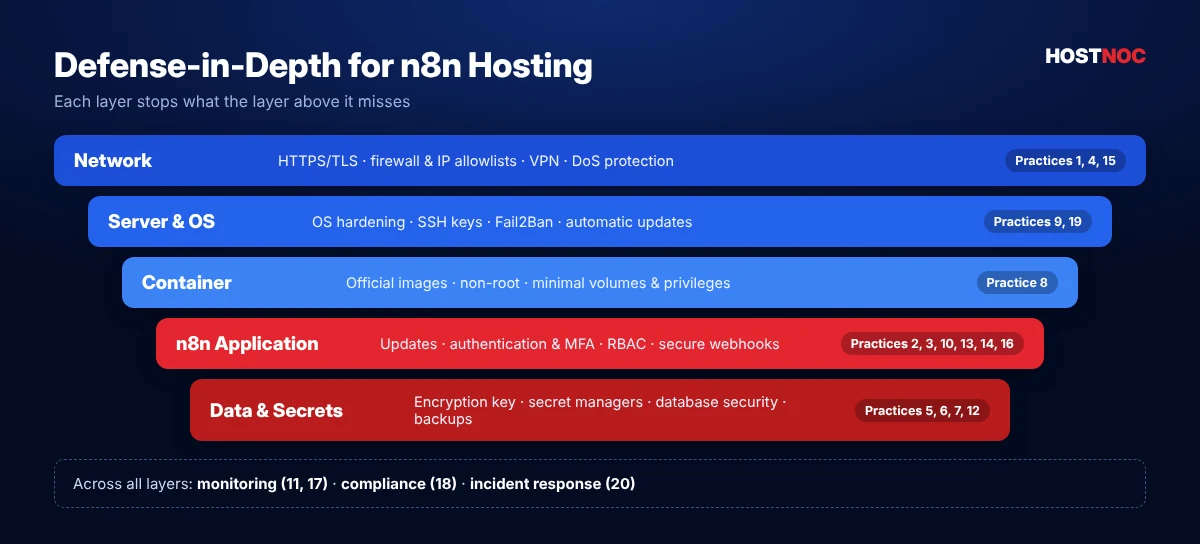
20 n8n Hosting Security Best Practices
Here are 20 n8n hosting security best practices you should adopt today, grouped from the network edge down to your data.
1. Always Use HTTPS
Running n8n over plain HTTP exposes authentication tokens, API keys, cookies and login credentials. Always configure SSL/TLS certificates, HTTPS redirection, modern TLS versions and secure cipher suites. Common reverse proxies include Nginx, Traefik, Caddy and HAProxy, and Let’s Encrypt makes certificate management free and straightforward.
- Encrypted traffic
- Secure authentication
- Protection against man-in-the-middle attacks
- Browser trust
server {
    listen 443 ssl http2;
    server_name automation.example.com;
    ssl_certificate     /etc/letsencrypt/live/automation.example.com/fullchain.pem;
    ssl_certificate_key /etc/letsencrypt/live/automation.example.com/privkey.pem;
    ssl_protocols TLSv1.2 TLSv1.3;

    location / {
        proxy_pass http://127.0.0.1:5678;
        proxy_http_version 1.1;
        proxy_set_header Upgrade $http_upgrade;
        proxy_set_header Connection "upgrade";
        proxy_set_header Host $host;
        proxy_set_header X-Forwarded-Proto $scheme;
    }
}
2. Keep n8n Updated
Security vulnerabilities are regularly discovered and patched, so always run the latest stable version. Updates deliver security fixes, bug patches, performance improvements, new authentication features and updated dependencies. With Docker, pull updated images regularly, review the n8n release notes before upgrading and test updates in staging before production.
3. Protect the n8n Editor With Authentication
Never expose the editor UI publicly without authentication. Since version 1.0, n8n includes built-in user management with an owner account, so create a strong owner password immediately after installation. Enable multi-factor authentication (MFA) for every user, and use SSO via SAML or LDAP on plans that support it. Strong passwords should include:
- 12+ characters
- Random symbols
- Uppercase and lowercase letters
- Numbers
- No reuse from other services
4. Restrict Network Access
Limiting who can reach your n8n server is one of the most effective n8n hosting security controls. Options include:
- VPN access
- IP allowlists
- Private VPC networking
- Cloud firewall rules
- Zero Trust networking
For internal automation, keep n8n entirely off the public internet whenever possible, and expose only the webhook paths that external services genuinely need.
sudo ufw default deny incoming
sudo ufw allow 22/tcp      # SSH (restrict to your IP if possible)
sudo ufw allow 443/tcp     # HTTPS via reverse proxy
sudo ufw enable            # port 5678 stays closed to the internet
5. Store Secrets Securely
Never hardcode credentials inside workflows or Code nodes. Use n8n’s encrypted credential store, environment variables and dedicated secret management systems instead, such as:
- AWS Secrets Manager
- HashiCorp Vault
- Google Secret Manager
- Azure Key Vault
6. Encrypt Credentials and Protect the Encryption Key
n8n encrypts stored credentials with an encryption key. Set your own strong key with the N8N_ENCRYPTION_KEY environment variable, store it securely, never commit it to Git and back it up safely. Without this key, restoring encrypted credentials from a backup is impossible.
# Generate a strong random key once and store it safely
openssl rand -hex 32

# .env
N8N_ENCRYPTION_KEY=your-generated-key
7. Secure Your Database
Most production deployments use PostgreSQL instead of SQLite. Database security includes private networking, TLS encryption, strong passwords, limited database permissions, regular backups and encryption at rest. Never expose database ports such as 5432 directly to the internet.
8. Follow Docker Security Best Practices
Docker simplifies deployment but introduces its own security considerations. Follow these recommendations:
- Use official n8n images
- Avoid privileged containers
- Run containers as non-root users (the official image already does)
- Mount only the volumes you need
- Limit container capabilities
- Keep Docker Engine updated
Use Docker Compose with minimal privileges. Our n8n Docker installation guide shows a secure, production-ready Compose file.
9. Harden Your Operating System
The server itself must remain secure. Recommended practices include:
- Automatic security updates
- Minimal installed packages
- SSH key authentication
- Disabled password and root login over SSH
- Fail2Ban
- UFW or iptables firewall
- SELinux or AppArmor
- Regular vulnerability scanning
A hardened host significantly reduces your attack surface. If you prefer not to manage this yourself, HostNOC’s server management team can handle hardening and patching for you.
10. Implement Role-Based Access Control (RBAC)
If multiple people manage workflows, assign permissions carefully and avoid giving every user administrative access. Separate permissions for developers, operators, administrators, view-only users and auditors. The principle of least privilege should always apply.
11. Monitor Logs Continuously
Logs help you detect suspicious behavior before it becomes a major incident. Monitor failed logins, API errors, unexpected workflow executions, permission changes, server resource usage and authentication failures. Popular centralized logging tools include Grafana Loki, Elasticsearch, OpenSearch, Splunk and Datadog.
12. Enable Automated Backups
Regular backups protect against ransomware, accidental deletion and hardware failure. Back up your database, workflows, credentials, configuration files and environment variables, including the encryption key. Test restoration periodically, because a backup that cannot be restored is effectively useless.
# Nightly PostgreSQL dump (add to cron)
docker exec n8n-postgres pg_dump -U n8n n8n | gzip > /backups/n8n-$(date +%F).sql.gz
13. Isolate Workflows and Environments
Production workflows should never share an environment with testing. Maintain separate development, staging and production instances to reduce accidental changes, improve testing, increase reliability and make rollbacks easier.
14. Secure API Endpoints and Webhooks
Many workflows expose webhooks to the internet. Secure them by validating incoming requests, verifying HMAC signatures, requiring API keys or OAuth tokens, filtering by IP and applying rate limits. n8n’s Webhook node supports header and basic authentication, so never leave a production webhook open and unauthenticated.
15. Protect Against Denial-of-Service (DoS) Attacks
Heavy webhook traffic can overwhelm an n8n instance. Mitigation strategies include reverse proxy rate limiting, a web application firewall (WAF), CDN protection, autoscaling, queue mode and load balancing. Cloudflare, AWS Shield and Azure DDoS Protection provide additional safeguards.
16. Secure Third-Party Integrations
Every connected application increases your attack surface. Regularly audit OAuth applications, API tokens, connected services, unused credentials and expired integrations, and remove anything that is no longer needed. Grant each credential the narrowest scopes possible.
17. Implement Security Monitoring
Security monitoring provides early warning signs. Track unusual workflow executions, geographic login anomalies, privilege escalation, configuration changes and failed authentication attempts. For larger organizations, integrate n8n and server logs with a Security Information and Event Management (SIEM) platform.
18. Maintain Compliance
Organizations in regulated industries must consider frameworks such as GDPR, HIPAA, SOC 2, ISO 27001 and PCI DSS. Compliance usually requires encryption, access controls, audit logs, data retention policies and documented incident response procedures. Self-hosting n8n makes data residency much easier to control.
19. Perform Regular Security Audits
Security is an ongoing process. Regularly review user accounts, workflow permissions, installed packages and community nodes, open ports, firewall rules, secrets management and database permissions. n8n also ships a built-in n8n audit command that flags risky credentials, nodes and settings.
docker exec -it n8n n8n audit20. Create an Incident Response Plan
Preparation minimizes downtime. Document recovery procedures, backup locations, credential rotation steps, notification processes, recovery time objectives (RTO) and recovery point objectives (RPO). Practice your incident response with periodic drills so the team knows exactly what to do.
Let HostNOC Secure Your n8n Server
Managed n8n hosting with SSL, firewalls, hardened servers, automated backups and 24/7 monitoring included.
Where to Start: Prioritizing n8n Hosting Security
Twenty practices can feel overwhelming, especially for small teams. The good news is that a handful of steps eliminate most real-world risk. Work through them in three phases:
| Phase | When | What to Do |
|---|---|---|
| Day 1 essentials | Before going live | HTTPS, owner account with MFA, closed port 5678, strong encryption key, firewall |
| First month | Once workflows are in production | PostgreSQL, automated backups, update schedule, secured webhooks, OS hardening |
| Ongoing maturity | As usage grows | RBAC, centralized logging, SIEM, compliance controls, audits and incident drills |
Smaller teams running a few internal workflows can usually stop after the first two phases. Organizations that process customer data, payments or health information should treat every phase as mandatory and document each control for auditors.
It also helps to assign clear ownership. Decide who is responsible for patching the server, who reviews user access, who rotates credentials and who tests backups. Security tasks without an owner are the ones that quietly stop happening, and that is when small gaps turn into serious incidents.
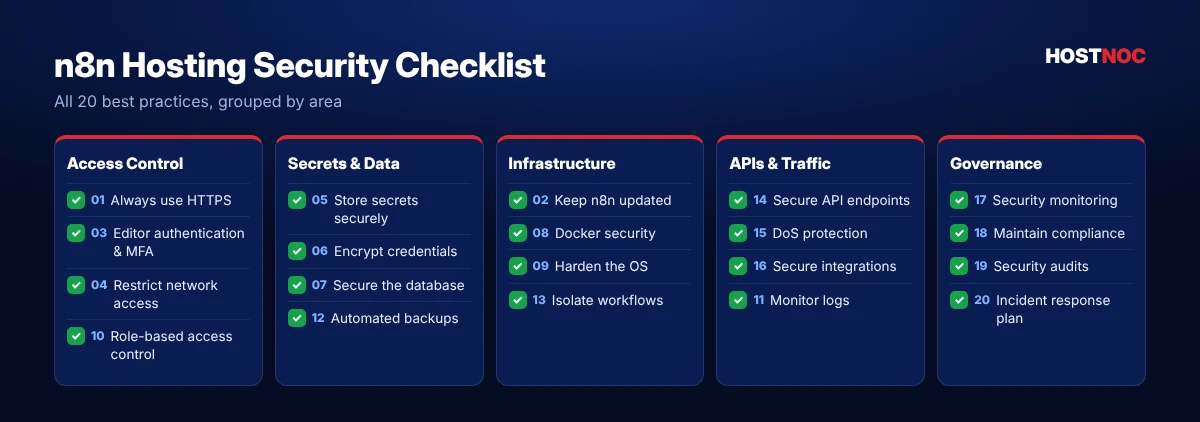
n8n Hosting Security Checklist
Use this checklist to review your n8n hosting security at a glance.
Key n8n Security Settings and Environment Variables
Several built-in n8n settings strengthen n8n hosting security. Review the official n8n security documentation for the full list.
| Setting | What It Does |
|---|---|
| `N8N_ENCRYPTION_KEY` | Sets the key used to encrypt stored credentials |
| `N8N_PROTOCOL=https` | Tells n8n it is served over HTTPS |
| `WEBHOOK_URL` | Sets the public URL used for webhooks behind a proxy |
| `N8N_SECURE_COOKIE=true` | Sends session cookies only over HTTPS |
| `N8N_BLOCK_ENV_ACCESS_IN_NODE=true` | Stops workflows from reading server environment variables |
| `EXECUTIONS_DATA_PRUNE=true` | Automatically deletes old execution data that may contain sensitive information |
| `N8N_DIAGNOSTICS_ENABLED=false` | Disables anonymous telemetry if your policy requires it |
Common n8n Hosting Security Mistakes
| Mistake | Risk | Fix |
|---|---|---|
| Editor exposed on port 5678 | Brute-force and credential theft | Close the port and use HTTPS via a reverse proxy |
| Default or reused passwords | Account takeover | Strong unique passwords plus MFA |
| Encryption key not backed up | Credentials lost after restore | Store the key in a secret manager |
| Unauthenticated webhooks | Fake requests trigger workflows | Header auth, HMAC signatures, rate limits |
| Months without updates | Known vulnerabilities exploited | Scheduled, tested upgrades |
| Database open to the internet | Full data breach | Private network and firewall rules |
For more operational pitfalls, read 10 common n8n hosting mistakes and how to avoid them.
Self-Hosted vs Managed n8n Hosting Security
With self-hosting, your team is responsible for every layer: the operating system, Docker, the database, TLS certificates, backups and monitoring. This gives you full control, but it also means every missed patch is your risk.
With managed n8n hosting, a provider takes over server hardening, patching, backups and monitoring, while you stay in charge of workflows, users and credentials. For many businesses, this shared-responsibility model delivers stronger n8n hosting security with far less effort. Compare the options in our guide to the best n8n hosting providers and our article on self-hosted vs cloud n8n.
HostNOC Tip: Whichever model you choose, keep a copy of your encryption key and latest database backup outside the server. It is the fastest way to recover from any incident.
Conclusion
n8n is a powerful automation platform, but its extensive integrations make it a high-value target if left unsecured. Effective n8n hosting security requires a defense-in-depth strategy that combines secure infrastructure, hardened operating systems, encrypted communications, strong authentication, secret management, continuous monitoring and disciplined operational practices.
Security is not a one-time configuration. Regular updates, credential rotation, access reviews, backup testing and security audits are essential to maintaining a resilient automation environment. By following these best practices, organizations can confidently use n8n for workflow automation while minimizing risks to sensitive data, connected systems and business operations.
Security is not a feature you switch on once. It is a habit you build into every update, every credential and every workflow.
Secure, Managed n8n Hosting
Skip the hardening checklist. HostNOC delivers n8n on secured servers with backups and expert support.
FAQs
n8n Hosting Security: Frequently Asked Questions
Quick answers to the questions people ask most.
Is self-hosting n8n secure?
Yes. Self-hosting n8n can be highly secure when deployed with HTTPS, strong authentication, firewalls, encrypted credential storage, regular updates and restricted network access. Security largely depends on how well the hosting environment is configured and maintained.
Should I use Docker or Kubernetes for hosting n8n?
Docker is an excellent choice for small to medium deployments because of its simplicity and portability. Kubernetes is better suited to larger environments that require high availability, autoscaling, advanced networking and centralized orchestration.
How should I store API keys and secrets in n8n?
Avoid hardcoding secrets in workflows. Use n8n’s encrypted credentials together with environment variables or dedicated secret management services such as AWS Secrets Manager, Azure Key Vault, Google Secret Manager or HashiCorp Vault.
What is the biggest security risk for an n8n deployment?
The most common risks are exposing the editor to the public internet, using weak or reused passwords, failing to update n8n regularly, storing credentials insecurely and leaving webhooks or APIs without authentication and rate limiting.
How often should I update and audit my n8n instance?
Install security updates as soon as practical after testing, run routine vulnerability scans, review user access and credentials at least quarterly, monitor logs continuously and verify backup and disaster recovery procedures regularly.
Does n8n support two-factor authentication?
Yes. n8n supports multi-factor authentication (MFA) for user accounts. Enable it for every user, especially owners and administrators.

Featured Post
n8n vs Zapier: Which One Should You Choose and Why?
n8n vs Zapier compared on ease of use, integrations, AI automation, pricing,...

n8n vs Make.com: Which Automation Platform Is Better?
n8n vs Make.com compared on ease of use, flexibility, integrations, AI automation,...
10 Best n8n Hosting Providers in 2026
Compare the 10 best n8n hosting providers in 2026, from managed n8n...
Follow us on:


Get the Latest News & Deals
Sign up to receive the latest news, updates and special offers from HostNOC.
I'd like to receive: