


Server Architecture: Everything You Need to Know
Server architecture is a critical aspect of modern computing infrastructure, especially as businesses and organizations increasingly rely on efficient, scalable and secure technology solutions. It serves as the backbone of everything from data management to cloud computing and virtual environments. In this article, we will delve into the fundamentals of server architecture, explain its different types and highlight essential components and best practices.
Server architecture is the design and structure of a server system: how its hardware, operating system, middleware, applications, network and security controls are organized to deliver services to users reliably. A well-planned server architecture keeps websites and applications fast, secure, scalable and available when traffic grows.
🔑 Key Takeaways
- Server architecture combines six layers: hardware, operating system, middleware, application, networking and security.
- The five common types are client-server, peer-to-peer, cloud-based, virtualized and distributed architecture.
- Scalability, redundancy, load balancing, backups, security and monitoring are the core best practices.
- Dedicated servers give the most control over every layer, while cloud and VPS trade some control for flexibility.
Every website, SaaS product, database and business application runs on top of some form of server architecture. Getting the design right affects page speed, uptime, security and hosting costs for years.
This guide explains what server architecture is, the key components, the main types, how to choose the right model and the best practices used by IT teams in 2026.
☰ Table of Contents (click to expand)
What Is Server Architecture?
Server architecture is the blueprint that defines how a server’s physical hardware and software components work together to receive requests, process data and return responses to clients. It covers resource management, high availability, network performance and security in a single design.
In simple terms, it answers three questions: what hardware runs the workload, what software manages it and how data moves safely between the server and its users. Whether you run one VPS server or a cluster of dedicated servers, the same architectural principles apply.
What Are the Key Components of Server Architecture?
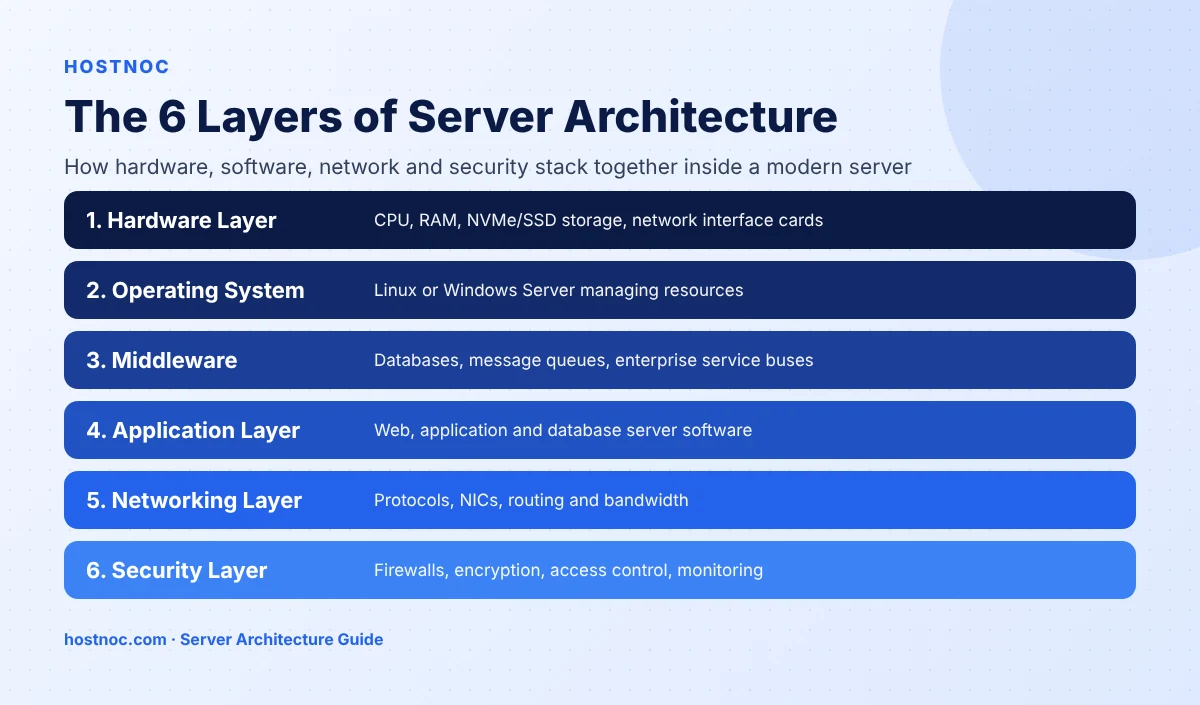
Server architecture is built from six layers. Each layer depends on the one below it, so a weakness in any layer affects the performance and security of the whole system.
1. Hardware Layer
The hardware layer is the physical foundation: the CPU, memory (RAM), storage (HDD, SSD or NVMe) and network interface cards. Faster processors, more RAM and NVMe storage directly improve speed, reliability and the ability to handle high loads.
2. Operating System (OS)
The operating system connects hardware to software and manages memory, CPU time and network traffic. Popular server operating systems include Linux distributions (Ubuntu, Debian, RHEL), Windows Server and Unix-based systems. Choose Linux dedicated servers for open-source stacks or Windows dedicated servers for .NET and Microsoft workloads.
3. Middleware
Middleware sits between the operating system and applications and provides shared services such as data management and messaging. Examples include database management systems, message queues and enterprise service buses (ESBs).
4. Application Layer
The application layer is where the server delivers its actual service: web servers, application servers or database servers. Applications use the OS and middleware to deliver data and features to end users.
5. Networking Layer
The networking layer includes the protocols and hardware that connect the server to the internet or internal networks, such as Ethernet interfaces and dedicated uplinks. High-traffic platforms often need 10 Gbps dedicated servers to move data without bottlenecks.
6. Security Layer
The security layer protects the server from unauthorized access, malware and data breaches using firewalls, encryption, anti-malware tools and access control. Follow a server hardening checklist to lock this layer down.
Build Your Architecture on Dedicated Hardware
Get full root access to every layer, from CPU and NVMe storage to the network and firewall, with 24/7 expert support.
What Are the Types of Server Architecture?
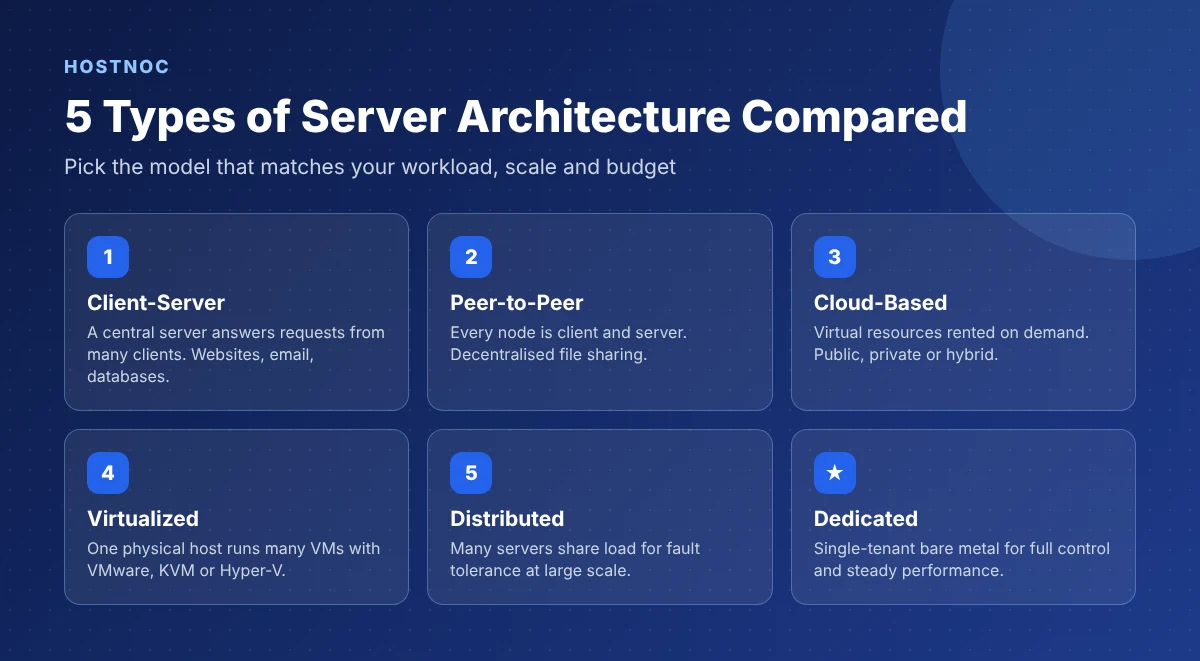
The five main types of server architecture are client-server, peer-to-peer, cloud-based, virtualized and distributed. Each one balances control, cost, scalability and fault tolerance differently.
1. Client-Server Architecture
In a client-server model, a central server hosts resources and clients request them. It is the most common model and powers websites, email, file servers and databases.
2. Peer-to-Peer (P2P) Architecture
In P2P architecture, each machine acts as both client and server, sharing resources without a central server. It is common in file-sharing and some blockchain systems.
3. Cloud-Based Architecture
Cloud server architecture provides scalable infrastructure over the internet, where businesses rent virtual servers and databases on demand. It can be public, private or hybrid; see public vs private vs hybrid cloud for the differences, or explore managed cloud hosting.
4. Virtualized Server Architecture
Virtualization lets one physical server host many virtual machines using hypervisors such as VMware, KVM or Hyper-V. It improves resource use and reduces costs. Learn more in our guide to server virtualization.
5. Distributed Server Architecture
Distributed architecture spreads workloads across many interconnected servers. Large e-commerce platforms and social networks use it for fault tolerance and massive scale.
| Type | Control | Scalability | Best For |
|---|---|---|---|
| Client-Server | High | Medium | Websites, email, databases |
| Peer-to-Peer | Low | High | File sharing, decentralized apps |
| Cloud-Based | Medium | Very high | Variable traffic, fast-growing apps |
| Virtualized | Medium–High | High | Multiple workloads on one host |
| Distributed | High | Very high | Large-scale, fault-tolerant platforms |
How Do You Choose the Right Server Architecture?
Choose server architecture by matching four factors to your workload: performance needs, traffic predictability, compliance requirements and budget. Steady, resource-heavy workloads suit dedicated servers, while unpredictable traffic suits cloud or VPS.
- Predictable, heavy workloads: dedicated servers for consistent performance and full control.
- Small to medium sites: a VPS offers isolated resources at a lower cost.
- Spiky or global traffic: cloud-based or distributed architecture with load balancing.
- Regulated data: single-tenant hardware that simplifies audits, such as a dedicated server for government.
Still deciding? Compare bare metal vs cloud computing to see which fits your budget and workload.
What Are the Best Practices for Server Architecture?
The best practices for server architecture are designing for scalability, building in redundancy, securing every layer, balancing load, automating backups and monitoring performance continuously.
1. Design for Scalability
Plan for growth through vertical scaling (upgrading CPU, RAM and storage) or horizontal scaling (adding servers). Scalability keeps performance stable during traffic spikes.
2. Build Redundancy and High Availability
Redundant power, storage and network paths keep services online when a component fails. Load balancers and failover systems help reach 99.99% uptime and avoid the costly consequences of downtime.
3. Follow Security Best Practices
Patch software regularly, configure firewalls, use SSL/TLS encryption, enforce multi-factor authentication (MFA) and apply role-based access control.
4. Use Load Balancing
Load balancing spreads traffic across multiple servers to reduce response times and prevent overload. Read our guide to server load balancing to set it up.
5. Automate Regular Backups
Automated, off-site backups let you recover quickly after hardware failure, ransomware or human error. Follow a tested data backup and recovery plan.
6. Monitor Performance and Analytics
Track CPU, memory, disk and network usage with tools like Nagios, Zabbix or New Relic to catch bottlenecks early. See our server monitoring guide for details.
Keeping these practices running day to day is part of ongoing server maintenance and correct server configuration.
Let Experts Manage Your Server Architecture
Patching, monitoring, backups and security hardening handled for you by HOSTNOC engineers around the clock.
Conclusion
Server architecture shapes how fast, secure and reliable your applications are. By understanding the six layers, choosing the right type for your workload and following best practices for scalability, redundancy, security and monitoring, you can build infrastructure that grows with your business.
Ready to put it into practice? Start with a HOSTNOC dedicated server or book a call with our team to plan the right architecture.
FAQs
Server Architecture: Frequently Asked Questions
Quick answers to the questions people ask most.
What is server architecture in simple words?
Server architecture is the design of a server system. It defines how hardware, the operating system, middleware, applications, networking and security work together to deliver data and services to users.
What are the main components of server architecture?
The main components are the hardware layer, operating system, middleware, application layer, networking layer and security layer.
What are the different types of server architecture?
The common types are client-server, peer-to-peer, cloud-based, virtualized and distributed server architecture.
Which server architecture is best for a growing business?
Most growing businesses start with a VPS or cloud server and move to dedicated servers or a load-balanced, distributed setup as traffic and performance needs increase.
What is the difference between client-server and peer-to-peer architecture?
Client-server uses a central server that answers client requests, while peer-to-peer lets every machine act as both a client and a server without a central host.
Is a dedicated server better than cloud architecture?
A dedicated server is better for steady, resource-heavy or compliance-sensitive workloads because it offers full control and consistent performance. Cloud architecture is better for unpredictable traffic that needs fast scaling.

Muhammad Osama
Featured Post
n8n Docker Installation Guide: Complete Step-by-Step Setup for Beginners and Production
Step-by-step n8n Docker installation guide covering Docker Compose, PostgreSQL, HTTPS, environment variables,...

15 n8n Workflow Examples to Automate Your Business
Real n8n workflow examples for marketing, sales, support, AI and DevOps, with...
n8n Workflows for Businesses: A Comprehensive Guide
A complete guide to n8n workflows for businesses: how they work, core...
Follow us on:


Get the Latest News & Deals
Sign up to receive the latest news, updates and special offers from HostNOC.
I'd like to receive: