


SSL Certificate Chain: A Comprehensive Guide
In the modern era of the internet, security is of utmost importance, especially when sensitive data such as passwords, credit card numbers, and personal information is being transferred. To ensure that communication between a user’s browser and a website is secure, SSL (Secure Sockets Layer) or its successor, TLS (Transport Layer Security), encryption protocols are used. One of the key components of these encryption protocols is the SSL certificate chain.
In this article, we will explore what an SSL certificate chain is, how it works, its components, and why it is critical for securing online communications.
An SSL certificate chain is what allows a browser to trust your website. Every time someone visits a page over HTTPS, their browser quietly checks a series of linked certificates to confirm that the site is genuine and that the connection is safe.
Security matters more than ever when passwords, card numbers and personal details travel across the internet. SSL (Secure Sockets Layer) and its modern successor, TLS (Transport Layer Security), encrypt that data. But encryption only works if the browser can verify who it is talking to, and that is exactly the job of the SSL certificate chain.
🔑 Key Takeaways
- An SSL certificate chain links your website’s certificate to a trusted root Certificate Authority (CA), enabling secure HTTPS connections.
- The chain has three parts: the root certificate, one or more intermediate certificates, and the server (end-entity) certificate.
- Browsers verify every link in the chain before they show the padlock and encrypt the connection.
- Intermediate certificates protect the root, improving security and making certificate management easier to scale.
- Common chain problems include missing intermediates, expired certificates, wrong order and untrusted roots, all of which trigger browser warnings.
In this guide, HOSTNOC explains what an SSL certificate chain is, how it works, why it matters, and how to find and fix the most common chain errors.
☰ Table of Contents (click to expand)
- What Is an SSL Certificate Chain?
- Key Components of an SSL Certificate Chain
- How Does an SSL Certificate Chain Work?
- SSL Certificate Chain Example
- Do DV, OV and EV Certificates Use the Same Chain?
- Why Is the SSL Certificate Chain Important?
- Common SSL Certificate Chain Issues (and How to Fix Them)
- How to Check Your SSL Certificate Chain
- How to Install a Complete SSL Certificate Chain
- How Long Do Certificates in the Chain Last?
- SSL Certificate Chain Best Practices
- Conclusion
- FAQs
What Is an SSL Certificate Chain?
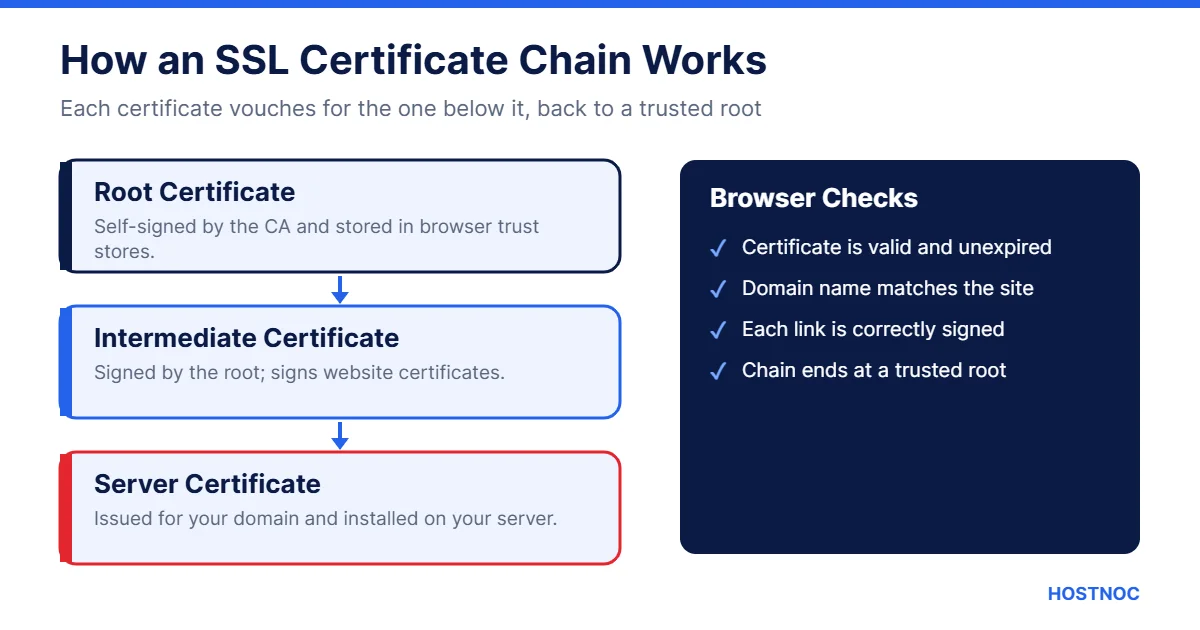
An SSL certificate chain is a sequence of certificates that creates a trust relationship between your website’s SSL certificate and a trusted root Certificate Authority (CA). Each certificate in the chain vouches for the one below it.
Think of it as a chain of trust. It starts with a root certificate issued by a trusted CA, passes through one or more intermediate certificates, and ends with the server certificate installed on your website. If every link is valid, the browser trusts your site.
You may also see the SSL certificate chain called the certificate chain of trust, the certification path or the CA bundle. They all describe the same idea.
Key Components of an SSL Certificate Chain
An SSL certificate chain typically includes three types of certificates.
Root Certificate
The root certificate is the foundation of the chain. It is issued by a Certificate Authority, a trusted organization responsible for issuing digital certificates. Root certificates come pre-installed in the trust stores of browsers, operating systems and devices.
A root certificate is self-signed, meaning the CA signs it with its own key. Because it is already in the trust store, browsers trust it automatically. It acts as the trust anchor for every certificate beneath it.
Intermediate Certificates
An intermediate certificate connects your server certificate to the trusted root. It is signed by the root CA or by another intermediate CA higher up in the chain.
Intermediates spread trust from the root to individual websites. CAs keep their root keys offline and highly protected, and use intermediate certificates to issue and sign website certificates day to day. If an intermediate is ever compromised, the CA can revoke it without replacing the root.
Server (End-Entity) Certificate
The server certificate, also called the leaf or end-entity certificate, is issued for a specific domain. It is the certificate your server presents to browsers when someone visits a site with “https://” in the address.
The server certificate contains key information, including:
- The domain name or hostname (and any additional names)
- The public key used for encryption
- Details of the Certificate Authority that issued it
- Validity dates, including when it expires
The server certificate is signed by an intermediate certificate. If it is valid and the full SSL certificate chain leads back to a trusted root, the browser establishes a secure connection.
| Certificate | Signed By | Where It Lives |
|---|---|---|
| Root certificate | Itself (self-signed) | Browser and OS trust store |
| Intermediate certificate | Root CA or another intermediate | Sent by your server |
| Server certificate | Intermediate CA | Installed on your server |
How Does an SSL Certificate Chain Work?
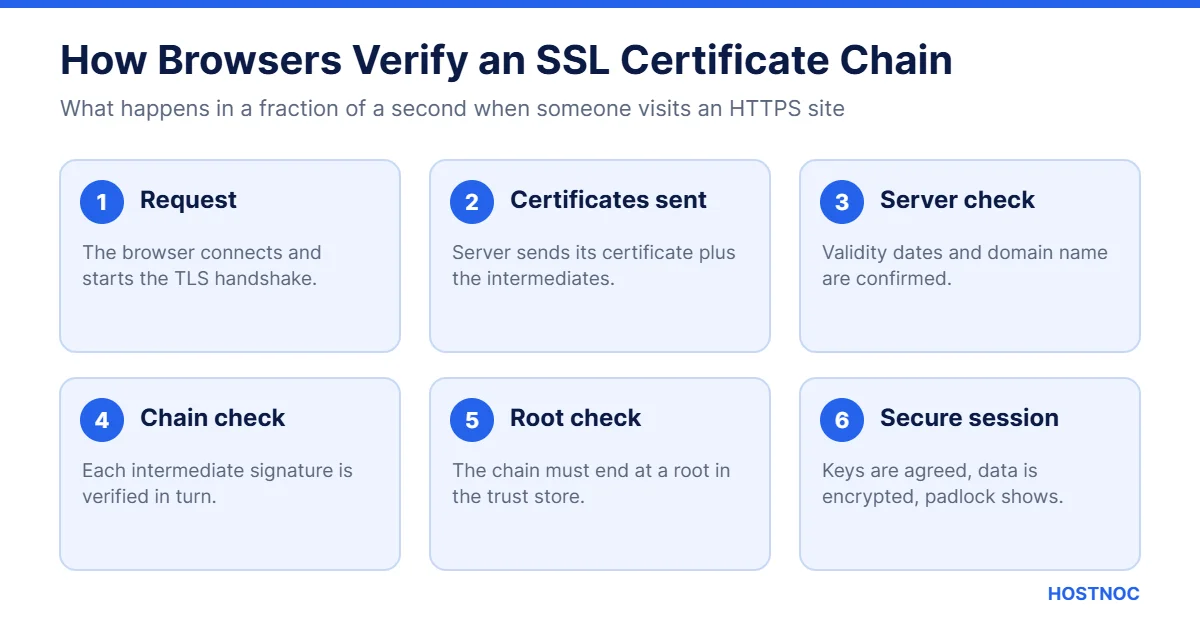
When a user visits a website over HTTPS, the following happens in a fraction of a second:
- The browser sends a request: It connects to the server and starts the TLS handshake.
- The server sends its certificates: It presents the server certificate along with the intermediate certificates.
- The browser verifies the chain: It checks that the server certificate is valid, unexpired and issued for the right domain. Then it checks that each intermediate is correctly signed by the certificate above it. Finally, it confirms the chain ends at a root certificate in its trust store.
- The secure connection is established: If every check passes, the browser and server agree on encryption keys and the padlock appears. If any link is broken, the browser shows a security warning.
Note that your server should normally send the server certificate and the intermediates, but not the root. The browser already has the root in its trust store.
An SSL certificate is only as trustworthy as the chain behind it. One missing link is enough to turn a padlock into a warning page.
SSL Certificate Chain Example
A real-world example makes the idea easier to follow. Take a website using a free certificate from Let’s Encrypt:
- Server certificate: Issued for the website’s domain, such as www.example.com.
- Intermediate certificate: Let’s Encrypt signs website certificates with intermediates such as R11 or E6.
- Root certificate: Those intermediates chain up to ISRG Root X1, which is trusted by modern browsers and operating systems.
When a visitor opens the site, the server sends the first two certificates. The browser already holds ISRG Root X1, so it can complete the SSL certificate chain and confirm the site is genuine. Commercial CAs such as DigiCert or Sectigo work the same way, just with their own intermediates and roots.
Do DV, OV and EV Certificates Use the Same Chain?
Yes. Domain Validated (DV), Organization Validated (OV) and Extended Validation (EV) certificates differ in how thoroughly the CA checks the applicant, not in how the SSL certificate chain works.
| Type | What the CA Verifies | Best For |
|---|---|---|
| DV | Control of the domain | Blogs, personal sites, small projects |
| OV | Domain plus organization details | Business websites and portals |
| EV | In-depth company verification | Banks, e-commerce and high-trust sites |
Whichever type you choose, you still need to install the correct intermediate certificates so browsers can build the full chain back to the root.
Why Is the SSL Certificate Chain Important?
The SSL certificate chain plays a critical role in secure communication. Here is why it matters.
Trust and Validation
The main purpose of an SSL certificate chain is to prove that a website is genuine. By tracing the server certificate back to a trusted root, the browser can confirm the site is not an imposter, such as a phishing website pretending to be your bank. This is one reason secure HTTPS also helps defend against spear phishing attacks.
Security of Data Transmission
A valid chain allows SSL/TLS encryption to protect data in transit. Credit card numbers, passwords and personal details sent between the browser and the server cannot be read or changed by attackers along the way.
Flexibility in Certificate Management
Intermediate certificates let CAs issue certificates without exposing the root to risk. This gives CAs more control and makes it easier to replace or revoke certificates if something goes wrong.
Scalability
Intermediates also help CAs issue millions of certificates across domains, subdomains and services, while the root stays safely offline.
User Confidence and SEO
Visitors trust sites that show a padlock and avoid sites with warnings. Search engines also prefer secure HTTPS websites. A broken SSL certificate chain can lead to lost visitors, abandoned carts and a weaker online reputation.
Host Your Website on Secure, Reliable Servers
HOSTNOC servers come with expert support to help you run HTTPS correctly and keep your site trusted.
Common SSL Certificate Chain Issues (and How to Fix Them)
Even though SSL certificate chains are essential, they are easy to misconfigure. Here are the most common problems and how to fix each one.
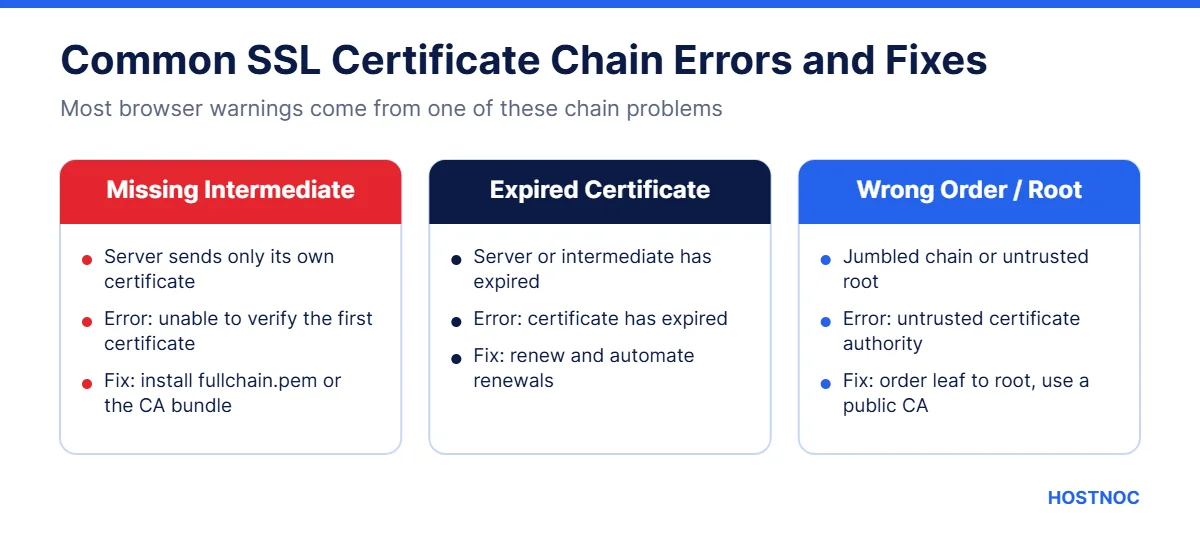
1. Incomplete Certificate Chain
This is the most common issue. The server sends its own certificate but leaves out one or more intermediates. Some browsers can fill the gap, but many devices, apps and APIs cannot, so users see errors such as “certificate not trusted” or “unable to verify the first certificate”.
Fix: Install the full chain file from your CA, often called fullchain.pem or a CA bundle, so your server sends the server certificate plus every intermediate.
2. Expired Intermediate Certificates
If an intermediate certificate expires, the chain breaks, even if your own certificate is still valid.
Fix: Download the current intermediate certificates from your CA and replace the old ones on your server. Renewing your certificate through your CA’s tools usually provides an updated bundle.
3. Untrusted Root Certificates
If the root certificate is not in the browser or operating system trust store, the chain will fail. This can happen with self-signed certificates, private CAs or very old devices that have not received trust store updates.
Fix: Use a certificate from a publicly trusted CA for public websites. For older devices, check whether your CA offers a compatible chain.
4. Certificates in the Wrong Order
The server should send certificates in order: server certificate first, then the intermediate that signed it, and so on toward the root. A jumbled order can confuse some clients.
Fix: Rebuild your chain file in the correct order and reload your web server.
5. Domain Name Mismatch
If the certificate does not include the exact domain visitors use, such as the “www” version, browsers will reject it even when the chain itself is correct.
Fix: Reissue the certificate with all required hostnames, or use a wildcard certificate where appropriate.
How to Check Your SSL Certificate Chain
You can test your SSL certificate chain in a few minutes:
- Online tools: The free Qualys SSL Labs server test shows your full chain and flags issues such as missing intermediates.
- Browser: Click the padlock in the address bar, open the certificate details and view the certification path.
- Command line: Run openssl s_client -connect yourdomain.com:443 -showcerts to see every certificate your server sends.
Check your chain after every certificate renewal, server migration or configuration change.
How to Install a Complete SSL Certificate Chain
The exact steps depend on your web server, but the principle is the same: point your server at a file that contains your certificate followed by the intermediates.
- Nginx: Use the full chain file in the ssl_certificate directive.
- Apache: On modern versions, point SSLCertificateFile to the full chain file; older versions use a separate SSLCertificateChainFile.
- Control panels: In cPanel, Plesk and similar tools, paste the CA bundle into the “Certificate Authority Bundle” field.
- Let’s Encrypt: Tools such as Certbot create a fullchain.pem file for you; use it rather than cert.pem.
After installing, restart or reload your web server and test again. If you prefer not to manage this yourself, a server management service can handle certificates, renewals and testing for you.
How Long Do Certificates in the Chain Last?
Each certificate in the chain has its own validity period. Root certificates often last many years, intermediates usually last a few years, and server certificates are much shorter.
Public server certificates are getting shorter over time. Browser makers and CAs have agreed to steadily reduce the maximum lifetime of website certificates, which means renewals will happen more often. Let’s Encrypt certificates, for example, already last only 90 days.
Shorter lifetimes improve security, but they also raise the risk of a forgotten renewal or a mismatched chain. Automation is the safest answer. Use a tool that renews certificates automatically and installs the latest full chain each time, then set up alerts so you know if a renewal ever fails.
SSL Certificate Chain Best Practices
Follow these best practices to keep your SSL certificate chain healthy:
- Always install the full chain, not just your server certificate
- Do not include the root certificate in the chain your server sends
- Automate certificate renewals to avoid surprise expiry
- Monitor expiry dates for both server and intermediate certificates
- Use modern TLS versions (TLS 1.2 and TLS 1.3) and disable outdated protocols
- Test your configuration after every change
Want to understand the ports HTTPS uses? Read our guide on what the HTTPS port is.
Let Our Experts Handle Your SSL Setup
Talk to HOSTNOC about managed hosting with secure configuration, monitoring and support.
Conclusion
An SSL certificate chain is a crucial part of internet security. It links your server certificate, through one or more intermediates, to a trusted root certificate, so browsers can confirm your site is genuine and encrypt every connection.
For website owners, understanding how the SSL certificate chain works is the key to avoiding common problems such as incomplete chains, expired intermediates and wrong ordering. A quick test after each renewal or change keeps the padlock showing and your visitors safe.
By keeping your chain complete and up to date, you protect sensitive data, build customer trust and support a safer internet for everyone.
FAQs
SSL Certificate Chain: Frequently Asked Questions
Quick answers about certificate chains, intermediates and errors.
What is an SSL certificate chain in simple terms?
It is a series of linked certificates, from your website’s certificate through intermediate certificates to a trusted root, that lets browsers confirm your site is genuine and secure.
What happens if an intermediate certificate is missing?
Some browsers and many apps cannot verify your certificate, so visitors may see “not trusted” or “unable to verify” errors. Install the full chain or CA bundle to fix it.
Should I include the root certificate in my chain?
Usually not. Browsers already have trusted roots in their trust stores, so your server only needs to send the server certificate and the intermediates.
How do I check my SSL certificate chain?
Use an online tool such as Qualys SSL Labs, view the certification path in your browser, or run openssl s_client with the -showcerts option.
What is the difference between a root and an intermediate certificate?
A root certificate is self-signed and stored in browser trust stores. An intermediate certificate is signed by the root and is used to sign website certificates, keeping the root safely offline.

Featured Post
Top 20 n8n Hosting Security Best Practices
20 proven n8n hosting security best practices covering HTTPS, authentication, secrets, Docker,...


7 Key Takeaways From IDC AI in Networking Report 2026
Artificial intelligence is widely expected to transform enterprise networking, but the IDC...


7 Key Takeaways from the IBM X-Force 2026 Threat Intelligence Index
The IBM X-Force 2026 Threat Intelligence Index shows a cyber threat landscape...
Follow us on:


Get the Latest News & Deals
Sign up to receive the latest news, updates and special offers from HostNOC.
I'd like to receive: