


Are you looking for the best free n8n templates to automate your work? Whether you want to build AI agents, automate email, generate SEO content, manage leads or streamline customer support, n8n offers ready-made workflows that you can import and customize without building every automation from scratch.
🔑 Key Takeaways
- Free n8n templates let you import ready-made workflows for email, content, sales, support and research instead of building every automation from scratch.
- A free template is not always free to run. Connected services such as OpenAI, Google Gemini or Anthropic may require paid API credits or subscriptions.
- Start with one simple workflow, test it with sample data, keep a human in the loop and expand only when the results justify it.
- Reliable n8n hosting keeps imported workflows running smoothly around the clock.
The challenge is choosing the right template. Some workflows are simple enough for beginners while others combine AI models, APIs, databases and multiple applications. A template may be free to download but still require paid API credits or subscriptions for the connected services.
In this guide, HostNOC shares 20 free n8n workflow templates by use case, with a breakdown of what each does, who should use it and what you need to get started.
☰ Table of Contents (click to expand)
- Quick Comparison: 20 Free n8n Templates
- Best n8n Templates for Productivity and Email Automation
- Best n8n Templates for Content Creation and SEO
- Best n8n Templates for Sales and Lead Generation
- Best n8n Templates for Email and Customer Support
- Best n8n Templates for Customer Feedback and Research
- Best n8n Templates for Market Research and Campaigns
- Best n8n Templates for Reporting and Monitoring
- How to Import and Set Up an n8n Template?
- Best Practices for Using Free n8n Templates
- Conclusion
- FAQs
Quick Comparison: 20 Free n8n Templates
| # | Template | Best Use Case | Difficulty |
|---|---|---|---|
| 1 | AI Email Triage | Email management | Beginner–Intermediate |
| 2 | AI Support Email Replies | Customer support | Intermediate |
| 3 | AI-Curated RSS Digest | Research and newsletters | Beginner–Intermediate |
| 4 | Telegram Idea Capture | Personal productivity | Intermediate |
| 5 | Personal AI Assistant | Tasks and daily organization | Intermediate–Advanced |
| 6 | SEO Blog Draft Generator | Content marketing | Intermediate |
| 7 | AI Blog Posts for WordPress | Blogging | Intermediate |
| 8 | Blog-to-Social Repurposing | Social media | Beginner–Intermediate |
| 9 | Social Post Approval System | Content operations | Intermediate |
| 10 | Social Media Distribution | Publishing workflows | Intermediate |
| 11 | AI Lead Qualification | Sales automation | Intermediate |
| 12 | Telegram Lead Scoring | Lead generation | Intermediate |
| 13 | Marketing Performance Tracking | Analytics | Intermediate |
| 14 | AI Email Classification | Inbox organization | Intermediate |
| 15 | Gmail Invoice Extraction | Finance operations | Intermediate |
| 16 | AI Support Ticket Triage | Help desk automation | Intermediate |
| 17 | Customer Satisfaction Surveys | Customer research | Intermediate |
| 18 | AI Trend Monitoring | Market research | Advanced |
| 19 | Event Marketing Content Generator | Campaign creation | Intermediate |
| 20 | Student Performance Monitoring | Reporting and alerts | Intermediate |
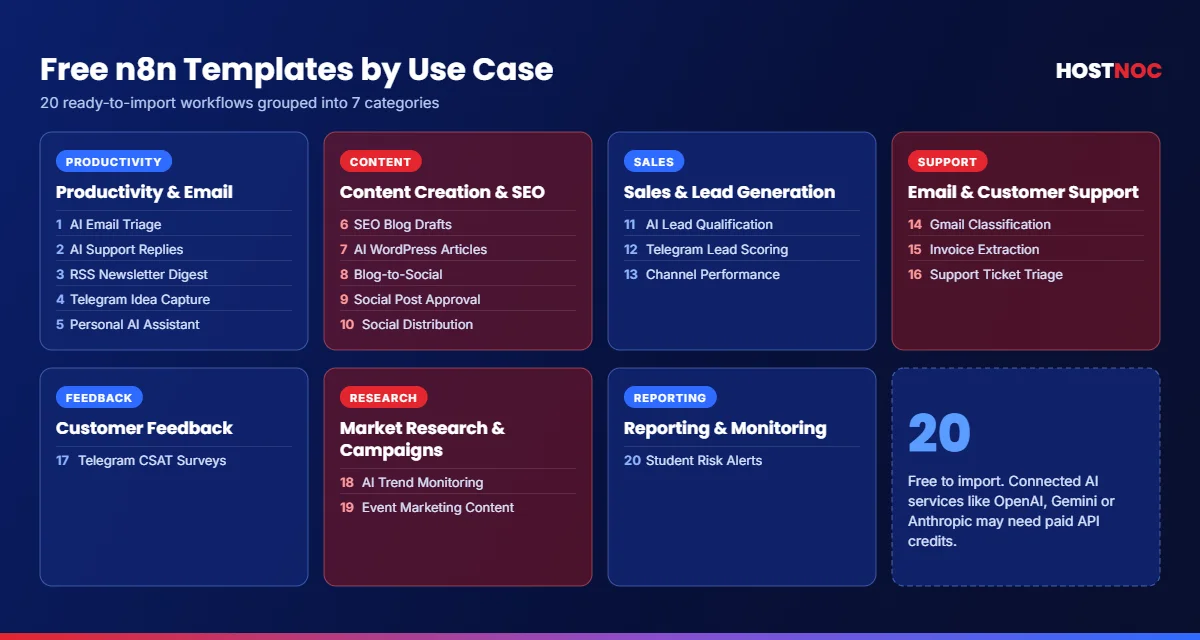
1. Best n8n Templates for Productivity and Email Automation
1. AI Email Triage and Inbox Management
Best for: Freelancers, founders, managers and busy professionals.
Get the free Gmail triage template
This workflow uses Google Gemini to classify incoming Gmail messages, summarize their contents, assess urgency and send notifications through Telegram. Less urgent emails can be logged in Google Sheets for later review. Depending on its configuration, the workflow can also help you respond to messages or manage calendar invitations from Telegram.
Key features:
- Categorizes incoming messages by urgency.
- Sends important notifications to Telegram.
- Stores selected messages in Google Sheets.
- Supports a daily review process.
Why is it useful?
You spend less time repeatedly checking your inbox and more time acting on messages that require attention.
What do you need?
Gmail, Google Gemini API access, Telegram and Google Sheets credentials.
2. AI-Powered Support Email Replies
Best for: Small businesses, SaaS companies and customer service teams.
Get the free support email automation template
This template turns a shared support inbox into a lightweight ticket-management system. It classifies incoming messages, logs legitimate requests, drafts responses based on your frequently asked questions and alerts your team when a complaint needs urgent attention. One useful feature is that AI-generated replies are saved as drafts rather than automatically sent. That gives a human the opportunity to review the response before it reaches the customer.
Key features:
- Classifies customer questions and complaints.
- Generates frequently asked questions-based draft replies.
- Records support requests in Google Sheets.
- Sends urgent alerts to Slack.
Why is it useful?
It reduces repetitive support work without requiring you to hand full control of customer communications to an AI model.
What do you need?
Gmail, an OpenAI API key, Google Sheets and optionally a Slack webhook.
3. AI-Curated RSS Newsletter Digest
Best for: Researchers, marketers, founders and newsletter creators.
Get the free RSS digest template
Keeping up with industry news often means reading dozens of websites. This workflow collects articles from configured RSS feeds, removes duplicates, ranks recent items, groups them into themes using artificial intelligence and sends a formatted digest through Gmail. You can adapt it to monitor competitors, follow developments in your industry or create a private weekly reading list.
Key features:
- Aggregates multiple RSS feeds.
- Filters duplicate and older articles.
- Generates AI-powered summaries.
- Delivers a themed HTML email digest.
Why is it useful?
You get a compact overview of relevant news instead of manually opening every source.
What do you need?
RSS feed URLs, Gmail and OpenAI API access.
4. Telegram-Based Idea Capture with AI
Best for: Creators, entrepreneurs, students and product teams.
Get the free Telegram idea-capture template
This workflow lets you capture ideas by sending text or voice messages to a Telegram bot. It can transcribe voice notes, use artificial intelligence to organize each idea and save structured records in Google Sheets. Instead of maintaining separate notes across multiple apps, you can send a quick message whenever inspiration strikes.
Key features:
- Captures ideas through Telegram.
- Supports voice-note transcription.
- Assigns categories, priorities and scores.
- Builds a searchable idea database.
Why is it useful?
It makes capturing ideas easy while organizing them into a format you can revisit and act on later.
What do you need?
Telegram, Google Sheets, an AI model and a compatible transcription service for voice notes.
5. Personal AI Assistant for Tasks, Email and Finance
Best for: Power users who want one interface for everyday administration.
Get the free personal AI assistant template
This more advanced workflow combines specialized AI agents with Telegram and Google Sheets to handle tasks such as tracking work hours, recording expenses, managing to-do lists and summarizing email. You interact with the system through natural-language messages rather than opening a different application for every task.
Key features:
- Tracks tasks and work hours.
- Records income and expenses.
- Summarizes email and highlights priorities.
- Stores information in structured spreadsheets.
Why is it useful?
It demonstrates how n8n can coordinate multiple specialized automations through one conversational interface.
What do you need?
Telegram, Google Sheets, an OpenAI API key and Gmail if you want email functionality.
Because it can touch personal and financial records, review permissions and test every action carefully before relying on it.
2. Best n8n Templates for Content Creation and SEO
6. Generate SEO Blog Posts and Save WordPress Drafts
Best for: Bloggers, SEO specialists, and content agencies.
Get the free SEO blog generator template
This workflow accepts a content request through an n8n form, creates an article outline, generates the individual sections and prepares SEO metadata and frequently asked questions. It then saves the finished article as a WordPress draft. The draft-based approach makes this template useful for teams that want to automate content production while keeping editorial approval in the process.
Key features:
- Accepts keywords and content requirements through a form.
- Generates structured article outlines and sections.
- Produces SEO titles, descriptions, and frequently asked questions.
- Saves articles to WordPress for review.
Why is it useful?
It automates the repetitive steps between receiving a content brief and preparing a draft for an editor.
What do you need?
Anthropic API access, a WordPress site and WordPress credentials.
7. Automatically Generate WordPress Articles with AI
Best for: Website owners who publish content regularly.
Get the free WordPress article automation template
This workflow uses a scheduled trigger and a predefined topic list to generate SEO-focused articles with OpenAI. It creates the article structure, metadata, tags and frequently asked question section before saving the post in WordPress. It can also populate SEO fields when the appropriate WordPress configuration is in place.
Key features:
- Generates articles on a schedule.
- Creates titles, slugs, and meta descriptions.
- Builds structured HTML content.
- Saves posts as drafts for approval.
Why is it useful?
It provides a repeatable content pipeline for websites that publish frequently.
What do you need?
OpenAI API access, WordPress REST API credentials and a list of topics or keywords.
Keep posts in draft mode until you have verified accuracy, search intent and content quality. Automation can speed up publishing but it does not guarantee search rankings.
8. Repurpose Blog Posts into Social Media Content
Best for: Content marketers, bloggers and social media managers.
Get the free blog-to-social template
This workflow reads recent articles from a blog’s RSS feed and uses Google Gemini to turn them into drafts for platforms such as LinkedIn and X. The drafts are saved in Google Sheets and shared through Slack for review. It helps you extract more value from content you have already published.
Key features:
- Monitors a blog RSS feed.
- Generates platform-specific social copy.
- Saves drafts in Google Sheets.
- Sends content to Slack for review.
Why is it useful?
One blog post can become several promotional assets without requiring you to rewrite the same material manually.
What do you need?
An RSS feed, Google Gemini API access, Google Sheets and Slack.
9. Create and Approve Social Media Posts with AI
Best for: Marketing teams, agencies and businesses with brand guidelines.
Get the free social post approval template
This workflow starts with a content brief, uses artificial intelligence and web research to develop different post angles, routes the work through an approval process and prepares social copy and visuals. It can log the outcome in Google Sheets. The exact publishing process depends on the integrations and configuration you enable.
Key features:
- Accepts content briefs through an n8n form.
- Generates multiple content angles.
- Supports human review and approval in Slack.
- Tracks briefs and results in Google Sheets.
Why is it useful?
It helps teams standardize content creation without sacrificing human oversight.
What do you need?
Google Gemini, Google Sheets, Slack and the additional research and image-generation services configured in the workflow.
10. Automate Social Media Content Distribution
Best for: Small businesses, creators and marketing teams.
Get the free social media distribution template
This template uses Google Sheets as a central content queue. When you add a new row with your content, links, images, hashtags and platform selections, n8n prepares the content and routes it through the configured publishing workflow. It is a useful starting point for teams that want to manage social content through a familiar spreadsheet.
Key features:
- Uses Google Sheets as a publishing queue.
- Structures content for selected platforms.
- Supports content distribution workflows.
- Integrates Slack into the process.
Why is it useful?
It centralizes content planning and reduces manual copying between spreadsheets and publishing tools.
What do you need?
Google Sheets, Slack and the platform-specific integrations required by your version of the workflow.
Check the template’s configured destinations before activating it; publishing capabilities vary by integration.
Run Your n8n Templates on Reliable Hosting
Import any of these free templates into a fast, secure n8n instance on HostNOC with NVMe storage and 24/7 expert support.
3. Best n8n Templates for Sales and Lead Generation
11. Qualify and Route Inbound Leads with AI
Best for: B2B sales teams, service businesses and lead-generation agencies.
Get the free AI lead qualification template
This workflow collects leads through a form, validates submitted information, checks for duplicates, enriches company details and uses artificial intelligence to assign a lead category. It then logs the result and routes follow-up notifications through Gmail and Slack.
Key features:
- Captures leads through a form.
- Validates email addresses and detects duplicates.
- Assigns lead scores and hot, warm, or cold categories.
- Notifies the sales team about qualified prospects.
Why is it useful?
Sales representatives can prioritize promising opportunities instead of manually sorting every incoming submission.
What do you need?
n8n Forms, Google Sheets, OpenAI API access, Gmail, Slack, and the configured company-enrichment service. Some integrations may require separate subscriptions or API credentials.
12. Qualify Telegram Leads and Notify Your Sales Team
Best for: Businesses that receive inquiries through Telegram.
Get the free Telegram lead-scoring template
This workflow turns a Telegram bot into a basic lead qualification assistant. It evaluates incoming conversations against your business criteria, scores prospects, records qualified leads in Google Sheets and emails your team when human follow-up is needed.
Key features:
- Responds to inbound Telegram messages.
- Scores prospects against configurable criteria.
- Maintains conversation state and handles common exceptions.
- Logs qualified leads and sends team notifications.
Why is it useful?
It can help small businesses qualify inquiries outside normal working hours without requiring someone to monitor every conversation.
What do you need?
Telegram bot credentials, OpenAI API access and optional Google Sheets and Gmail integrations.
Test the qualification rules with real-world examples of good, poor and borderline leads before using the scores to prioritize your sales pipeline.
13. Track Marketing Channel Performance Automatically
Best for: Growth marketers, CRM managers and sales operations teams.
Get the free marketing performance template
This workflow retrieves opportunities from GoHighLevel, identifies deals marked as won, calculates conversion performance by marketing source and sends a summary to Slack. It also records the underlying data in Google Sheets.
Key features:
- Retrieves CRM opportunity data.
- Filters closed-won deals.
- Calculates lead-to-sale performance by source.
- Creates reports for Slack and Google Sheets.
Why is it useful?
It gives teams a clearer view of which marketing channels generate actual sales rather than just clicks or inquiries.
What do you need?
GoHighLevel, Google Sheets, Slack, and suitable CRM permissions. You can extend the workflow with additional calculations for revenue, cost per acquisition or campaign-level performance if those data points are available.
4. Best n8n Templates for Email and Customer Support
14. Classify Gmail Messages with AI
Best for: Professionals managing high-volume inboxes and teams handling shared email accounts.
Get the free Gmail classification template
This workflow examines incoming unread emails and uses Google Gemini to classify them as questions, requests, complaints, informational messages or spam. It then routes each category to an appropriate action. For example, a question can generate a Gmail draft while a complaint can trigger a Slack alert and a follow-up task.
Key features:
- Classifies email intent.
- Creates draft replies for selected messages.
- Escalates complaints and follow-up tasks.
- Records processing outcomes in Google Sheets.
Why is it useful?
It makes inbox processing more consistent and helps teams respond to high-priority messages faster.
What do you need?
Gmail, Google Gemini API access, Slack, Google Sheets and Google Tasks.
15. Extract Invoice Information from Gmail
Best for: Freelancers, bookkeepers, small businesses and finance teams.
Get the free Gmail invoice triage template
This workflow classifies incoming messages, identifies invoices, extracts relevant information and logs invoice details in Google Sheets. It can also apply Gmail labels, create draft replies and send Telegram alerts for urgent messages.
Key features:
- Detects invoice-related emails.
- Extracts fields such as invoice number, issuer, tax, total, and currency.
- Records information in a spreadsheet.
- Alerts you to messages requiring attention.
Why is it useful?
It reduces the manual work involved in transferring invoice details from email into a tracking sheet.
What do you need?
Gmail, Google Gemini API access, Telegram and Google Sheets for invoice logging.
Treat extracted financial data as unverified until it has been checked against the original invoice.
16. Classify Support Emails and Draft Responses
Best for: Customer success teams and companies that want a lightweight support workflow.
Get the free support ticket classification template
This workflow uses Claude to analyze incoming support messages, determine their category and urgency, prepare responses and route tickets to the appropriate next step. Urgent cases can be escalated through Slack while the team maintains a spreadsheet log.
Key features:
- Classifies customer requests and support tickets.
- Generates response drafts.
- Escalates urgent issues.
- Maintains a record of support activity.
Why is it useful?
It provides a starting point for a more structured support operation without requiring a full help desk platform.
What do you need?
Gmail, Anthropic API access, Slack, and Google Sheets.
Before enabling automatic replies, test the workflow against your policies, refund rules, and escalation requirements.
5. Best n8n Templates for Customer Feedback and Research
17. Run Customer Satisfaction Surveys with Telegram
Best for: Product teams, small businesses and market researchers.
Get the free customer satisfaction survey template
This workflow runs a conversational survey through a Telegram bot. It retrieves questions from Google Sheets, records responses and uses artificial intelligence to ask relevant follow-up questions when a response needs clarification.
Key features:
- Conducts surveys through Telegram.
- Retrieves survey questions from Google Sheets.
- Uses AI to explore open-ended feedback.
- Stores responses for later analysis.
Why is it useful?
You can collect structured answers while still giving respondents room to explain their experiences in their own words.
What do you need?
Telegram, Google Sheets, an AI model and Redis for session state and conversational memory in the documented setup.
It is an ideal choice for collecting product feedback, testing customer satisfaction and conducting lightweight research with a defined set of questions.
6. Best n8n Templates for Market Research and Campaigns
18. Monitor Content Trends Across Social Media
Best for: Content strategists, social media managers and marketing agencies.
Get the free content trend monitoring template
This workflow gathers trend information from configured social and research sources, processes it with artificial intelligence and produces insights that can inform content planning. Depending on the configured data sources, it can help identify recurring topics, popular formats and potential opportunities for future posts.
Key features:
- Collects trend information from multiple sources.
- Analyzes content patterns using AI.
- Produces content strategy insights.
- Integrates Slack and Google Sheets.
Why is it useful?
It provides a repeatable way to turn scattered research into information your marketing team can act on.
What do you need?
The relevant data-source APIs or scraping services, an AI model, Slack and Google Sheets.
The listed template uses community nodes that are compatible with self-hosted n8n. Check the required nodes and source-service terms before installing it.
19. Generate Event Marketing Content Automatically
Best for: Event organizers, conference teams and campaign managers.
Get the free event marketing content template
This workflow takes event details and audience preferences and generates marketing copy for multiple channels including promotional emails, social media posts and advertisements. It can serve as the first step in a broader campaign workflow that includes approvals, scheduling and performance tracking.
Key features:
- Generates promotional copy from event details.
- Adapts messaging to the target audience.
- Creates content for multiple channels.
- Uses Google Sheets and Slack in the workflow.
Why is it useful?
It speeds up campaign preparation when you’re promoting recurring events or managing multiple events at once.
What do you need?
OpenAI API access, Google Sheets, Slack and the event-input mechanism configured in the template.
Review event dates, pricing, speaker details and registration links before distributing generated content.
7. Best n8n Templates for Reporting and Monitoring
20. Monitor Student Performance and Send Risk Alerts
Best for: Educators, training organizations and administrators managing student progress.
Get the free student performance monitoring template
This workflow reviews student performance data in Google Sheets, calculates risk indicators from attendance and assignment completion, and uses AI to generate personalized messages for students who may need additional support. It can also send a summary to teachers through Slack and Telegram while maintaining a historical log of performance indicators.
Key features:
- Reviews student attendance and assessment records.
- Calculates configurable risk indicators.
- Generates personalized outreach messages.
- Sends teacher summaries and records historical trends.
Why is it useful?
It helps educators identify students who may benefit from early intervention instead of waiting until the end of a term.
What do you need?
Google Sheets, OpenAI API access, Gmail, Slack and Telegram.
Student records are sensitive. Restrict access to the workflow, minimize the personal data processed and require educator review before sending messages or making consequential decisions.
How to Import and Set Up an n8n Template?
Here is a step-by-step process you can follow to import and set up an n8n template.
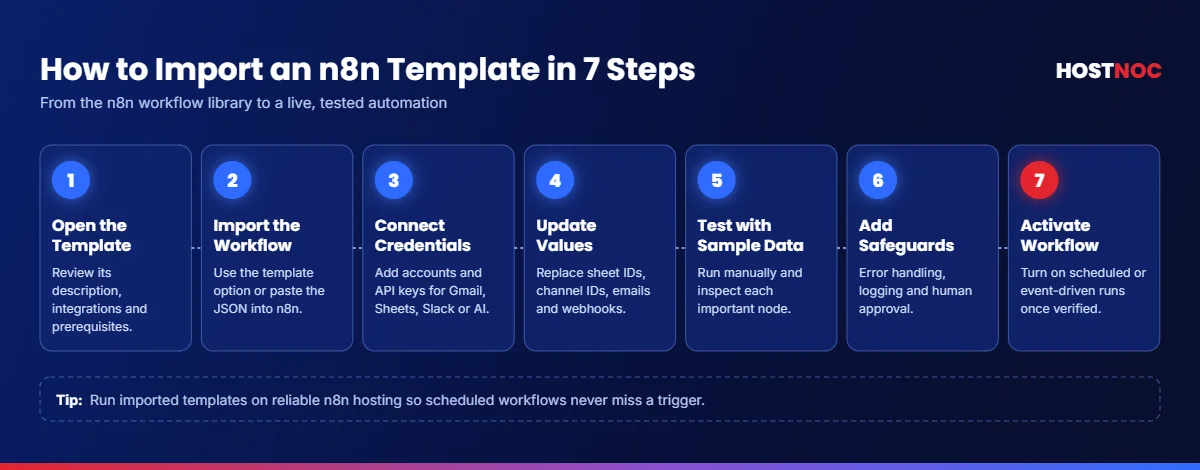
- Open the template: Visit its page in the official n8n workflow library and review the description, integrations and prerequisites.
- Import the workflow: Use the available template option or import the workflow JSON into your n8n instance. If you don’t have one yet, learn how to install n8n on a VPS.
- Connect your credentials: Configure the required accounts and API keys for services such as Gmail, Google Sheets, Slack or an AI provider.
- Update configuration values: Replace example spreadsheet IDs, channel IDs, email addresses, webhook URLs and placeholder text.
- Test with sample data: Run the workflow manually and inspect the output of each important node.
- Add safeguards: Configure error handling, duplicate prevention, logging and human approval for consequential actions.
- Activate the workflow: Enable scheduled or event-driven execution only after you have verified the expected behavior.
Best Practices for Using Free n8n Templates
1. Start Small
Avoid importing a complex, multi-agent workflow as your first project. Begin with a simple automation, such as moving form submissions into Google Sheets, then add AI processing or notifications as needed.
2. Protect API Keys and Credentials
Use n8n’s credential-management features rather than hardcoding secrets into workflow nodes. Give each integration only the permissions it needs.
3. Keep a Human in the Loop
AI is useful for classification, summaries, and draft generation, but it can make mistakes. Require approval for customer-facing messages, financial operations, and other actions that could have significant consequences.
A template is a starting point, not a guarantee of security. Review every node and test it with non-sensitive data before putting it into production.
4. Monitor Workflow Failures
An automation that fails silently can be worse than a manual process. Configure error notifications, retain useful execution logs, and test what happens when an API returns an error or a required field is missing. Many failures trace back to the server itself, so avoid these common n8n hosting mistakes.
5. Check Community Nodes
Some templates rely on third-party community nodes rather than integrations included in a standard n8n installation. Verify compatibility, maintenance status, and security before installing them, particularly on production systems.
Conclusion
Free n8n templates can save significant development time when you choose one that matches a real business need. For email management, start with AI email triage. For content teams, try blog-to-social repurposing or SEO blog draft generation. For sales, explore AI lead qualification. And for personal productivity, consider Telegram-based idea capture.
Once your workflows run around the clock, the server behind them matters too. See the benefits of managed n8n hosting for keeping automations fast, secure and always available.
The smartest approach is to start with one workflow, test it thoroughly, measure the time it saves and expand only when the results justify the added complexity.
Ready to Put These n8n Templates to Work?
Get managed n8n hosting from HostNOC and run your automations 24/7 without the server headaches.
FAQs
Free n8n Templates: Frequently Asked Questions
Quick answers to the questions people ask most.
What are the best free n8n templates for beginners?
Start with an RSS digest, a blog-to-social content workflow, or a straightforward email classification automation. These demonstrate common patterns such as triggers, data transformation, AI processing, and sending notifications without requiring a large system.
Can I use n8n templates without coding?
Yes. Most templates can be configured through n8n’s visual editor, although you may occasionally need to edit expressions, JSON, or small code snippets. Complex API integrations may require additional technical knowledge.
Do free n8n templates require an API key?
Not always. Simple workflows using built-in nodes or publicly available feeds may not need AI credentials. Templates that call OpenAI, Anthropic, or other external services generally require the appropriate credentials, and those services may charge for usage.
Can I use these templates with self-hosted n8n?
Many workflows can be imported into a self-hosted instance, provided the necessary nodes and integrations are available. Templates that depend on community nodes, external services, or particular n8n features may require additional setup.
Are free n8n templates safe to use?
A template is a starting point, not a guarantee of security. Review every node, examine outgoing API requests, verify credential permissions, and test the workflow with non-sensitive data before putting it into production.
Can I customize an n8n template for my business?
Yes. You can replace integrations, modify prompts, change routing rules, add approval steps, and connect your own databases or APIs. Check the template’s license and the terms of any third-party services before redistributing a modified workflow.

Featured Post
n8n Hosting for AI Automation: Why HostNOC Is Built for Reliable, Scalable AI Workflows
Learn why reliable n8n hosting matters for AI automation and how HostNOC...

n8n vs Make.com: Which Automation Platform Is Better?
n8n vs Make.com compared on ease of use, flexibility, integrations, AI automation,...
n8n vs Zapier: Which One Should You Choose and Why?
n8n vs Zapier compared on ease of use, integrations, AI automation, pricing,...
Follow us on:


Get the Latest News & Deals
Sign up to receive the latest news, updates and special offers from HostNOC.
I'd like to receive: