


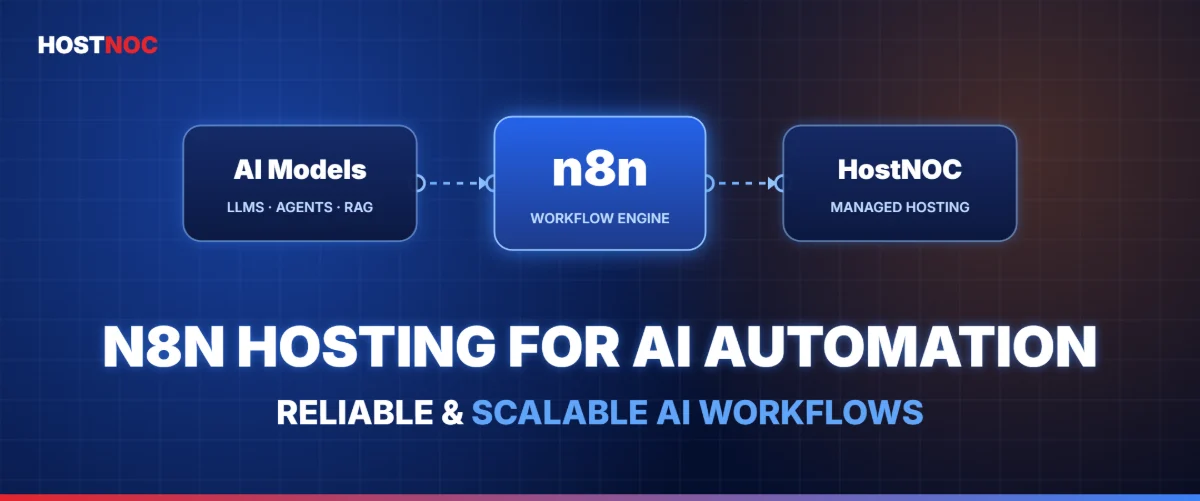
Choosing the right n8n hosting for AI automation matters more than ever, because artificial intelligence has changed how businesses automate operations. From AI-powered customer support and document processing to lead enrichment and content generation, teams now connect several AI services into one automated system. Among workflow platforms, n8n has become a top choice thanks to its flexibility, open-source (fair-code) model and hundreds of integrations.
🔑 Key Takeaways
- Reliable hosting is the foundation of AI automation, especially when workflows call multiple APIs, large language models (LLMs), databases and long-running executions.
- Managed n8n hosting removes server administration so your team can focus on building automations.
- Scalable resources, strong security and high availability make managed hosting the practical choice for production AI workflows.
However, many AI automation projects underperform not because of poor workflow design, but because of weak hosting. Slow executions, failed runs, unexpected downtime, API timeouts and resource bottlenecks often start in the hosting environment, not in n8n itself.
This is where HostNOC n8n hosting gives you an advantage. Instead of configuring servers, securing infrastructure and managing updates, you build AI workflows while HostNOC manages the environment.
This guide explains how n8n hosting supports AI automation, which infrastructure features matter, how to optimize performance and why managed hosting has become the preferred approach for serious automation projects.
☰ Table of Contents (click to expand)
- Why Does Hosting Matter More for AI Automation Than Traditional Workflows?
- What Is n8n for AI Automation?
- Why Is Managed n8n Hosting Better Than Self-Hosting?
- Infrastructure Requirements for Production AI Workflows
- Security Considerations for AI Automation
- Performance Optimization for AI Workloads
- AI Automation Use Cases Supported by HostNOC
- Scalability for Growing Automation Needs
- Reliability and High Availability
- Backup and Disaster Recovery
- Developer Experience
- Monitoring AI Workflow Health
- Cost Efficiency of Managed Hosting
- Best Practices for Running AI Automation on n8n
- Why Businesses Choose HostNOC for n8n Hosting
- Conclusion
- FAQs
Why Does Hosting Matter More for AI Automation Than Traditional Workflows?
Traditional automation usually moves data from one app to another. AI automation is different. A single AI workflow may involve:
- Vector databases such as Pinecone
- PostgreSQL and Redis
- Slack, Gmail and CRM systems
- PDF parsing and OCR engines
- Image generation
- Web scraping
- Internal APIs
Each step adds latency, uses resources and creates a possible point of failure. AI workflows can also run for several minutes while they process large datasets, generate content or talk to multiple AI models.
If your server lacks enough CPU, memory or network performance, the workflow becomes unreliable. HostNOC solves this with infrastructure built for sustained automation workloads, not lightweight scripts.
What Is n8n for AI Automation?
n8n is an extensible workflow automation platform. It lets you connect services through visual workflows while still supporting advanced customization with JavaScript, Python, HTTP requests and custom logic. If you are new to the hosting side, start with our guide on what n8n hosting is.
Modern AI automation built on n8n commonly includes:
- AI-powered chatbots and internal assistants
- Multi-agent orchestration
- Retrieval-Augmented Generation (RAG)
- Customer support automation
- Lead qualification and data enrichment
- Intelligent document processing
- Sales automation and marketing personalization
Instead of writing thousands of lines of integration code, n8n orchestrates these services visually while keeping developer-level flexibility. That mix has made it popular with startups, agencies, enterprises and AI consultants. See real use cases in our list of n8n workflow examples.
Why Is Managed n8n Hosting Better Than Self-Hosting?
Self-hosting looks cheap at first. In practice, it adds ongoing work that eats engineering time, including:
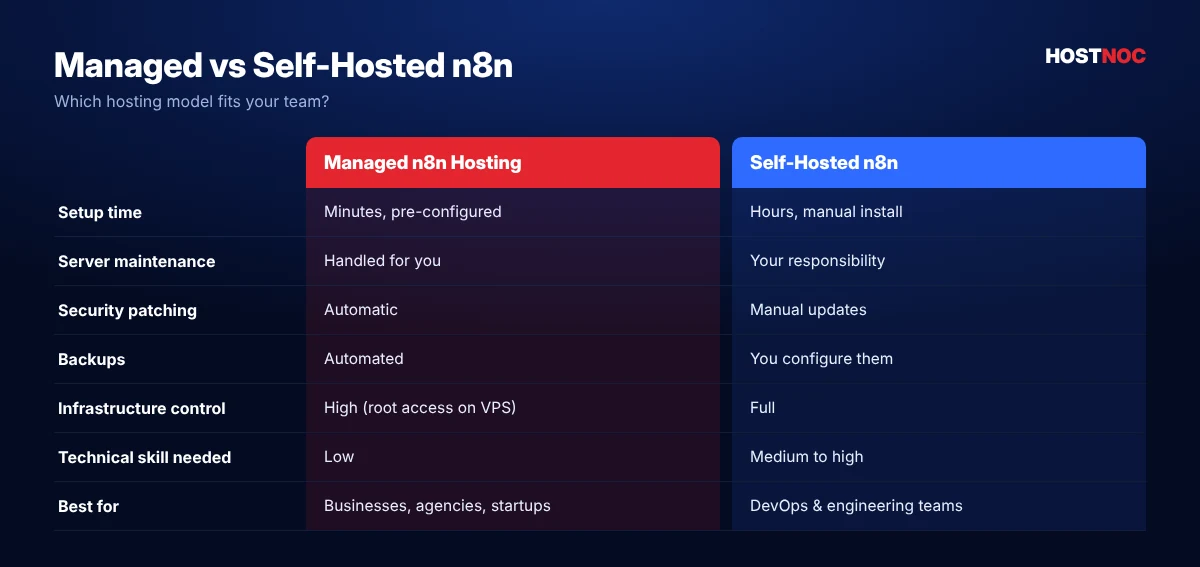
- Server provisioning and SSL installation
- Reverse proxy configuration
- Database management and backup scheduling
- Monitoring and security patches
- Docker updates and Node.js upgrades
- Performance tuning
For AI automation, infrastructure downtime directly affects business operations. HostNOC removes these burdens with a managed environment configured specifically for n8n, so your team improves workflows instead of troubleshooting servers. Many of these issues are covered in our post on common n8n hosting mistakes.
| Factor | Self-Hosted n8n | Managed n8n Hosting (HostNOC) |
|---|---|---|
| Setup time | Hours to days of server work | Ready to build quickly |
| Security and updates | Your team patches everything | Handled for you |
| Backups | Must be scripted and tested | Backup strategy supported |
| Scaling | Manual migration or rebuild | Resources scale as you grow |
| Support | Community forums only | Professional support team |
| Best for | DevOps-heavy teams | Teams focused on automation |
Still deciding? Compare both models in detail in self-hosted vs cloud n8n.
Infrastructure Requirements for Production AI Workflows
AI automation creates much heavier workloads than ordinary automation. A production environment typically needs:
- High-performance CPUs for concurrent workflow execution
- Generous RAM for memory-intensive AI operations
- Fast NVMe SSD storage for workflow history and databases
- Stable network connectivity for low-latency API calls
- Scalable compute resources as workflow volume increases
- Reliable uptime for business-critical automation
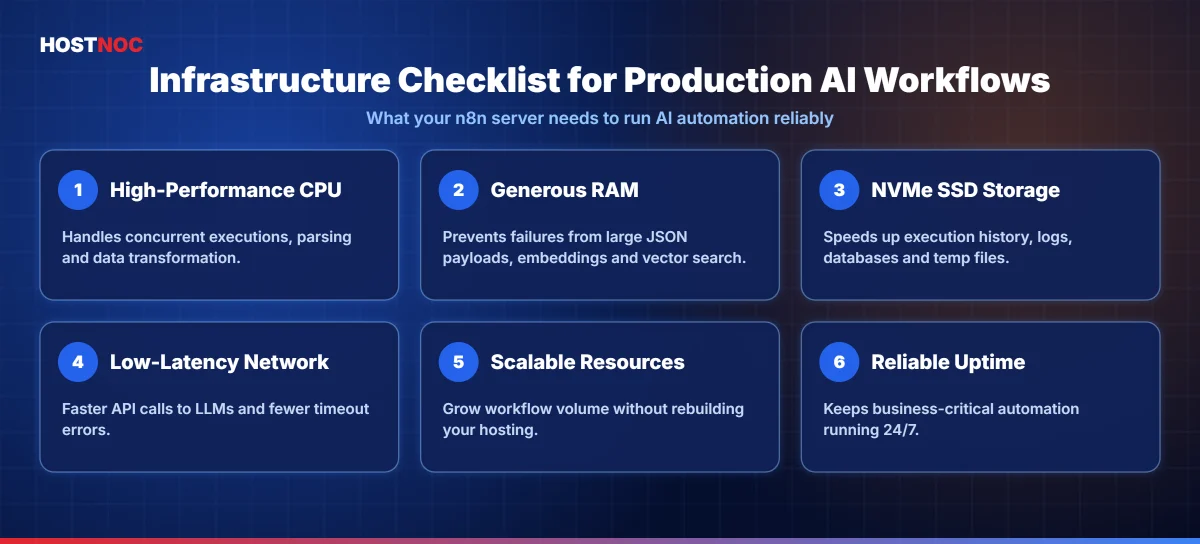
HostNOC’s hosting environment is designed around these production requirements, so workflows keep running efficiently as automation complexity grows. If you prefer full root control, our VPS servers and Linux VPS hosting are also strong foundations for n8n.
Run AI Workflows on Infrastructure Built for n8n
Deploy n8n on high-performance HostNOC servers with NVMe storage, strong security and 24/7 expert support.
Security Considerations for AI Automation
AI workflows often process sensitive business information, such as:
- Customer records and sales conversations
- Financial reports
- Internal documentation
- Healthcare and legal documents
- Employee records
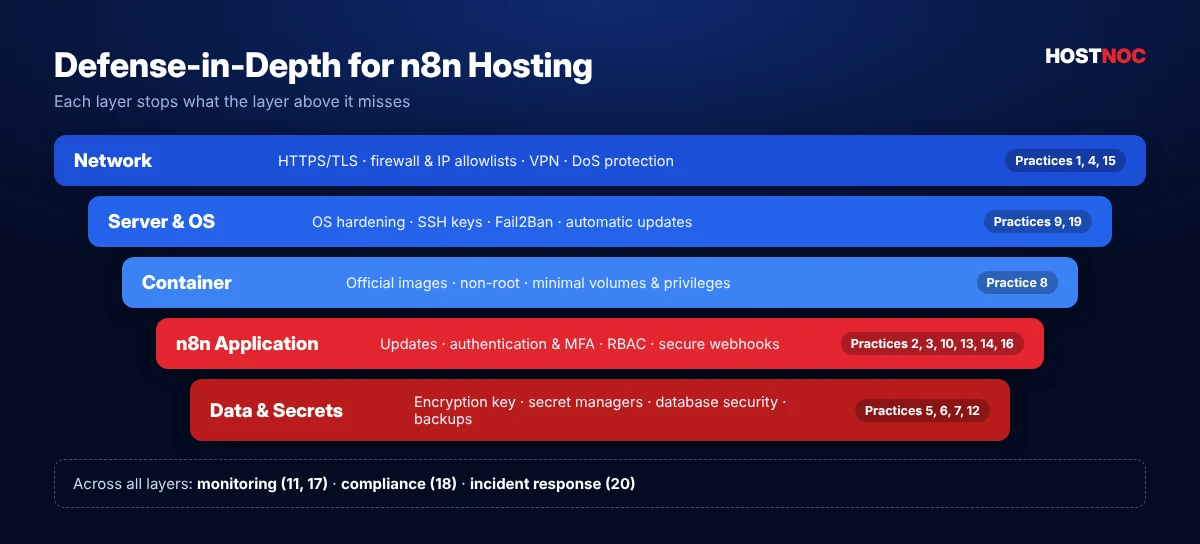
That makes a secure hosting environment essential, not optional. HostNOC helps strengthen security through managed infrastructure, encrypted connections, controlled access and secure deployment practices that reduce operational risk.
Security should go beyond the application layer. It should include server hardening, access management, data protection and infrastructure monitoring.
Your AI workflows are only as reliable as the server they run on. Great automation logic cannot fix weak infrastructure.
Performance Optimization for AI Workloads
Hosting performance directly affects how fast your AI workflows run. These four components matter most.
CPU Performance
Language models generate many API requests, and document parsing and data transformation consume processing power. Multiple concurrent executions push CPU usage higher. Modern processors deliver much better throughput than entry-level virtual machines.
Memory Allocation
Insufficient RAM is a common cause of workflow failures. Large JSON responses, AI embeddings, vector search and document processing all need significant memory, so production environments benefit from generous allocation.
Storage Speed
Workflow logs, execution history, databases and temporary files create frequent disk operations. NVMe storage cuts latency significantly compared to older storage technologies.
Network Quality
Every AI workflow talks to external APIs. Lower latency improves responsiveness and reduces timeout risks. Reliable connectivity matters more as workflows integrate dozens of services.
HostNOC Tip: Set realistic timeout and retry values on HTTP Request and AI nodes. LLM calls can take longer under load, and a sensible retry policy prevents one slow response from failing the whole workflow.
AI Automation Use Cases Supported by HostNOC
HostNOC lets organizations run sophisticated AI automation across many business functions.
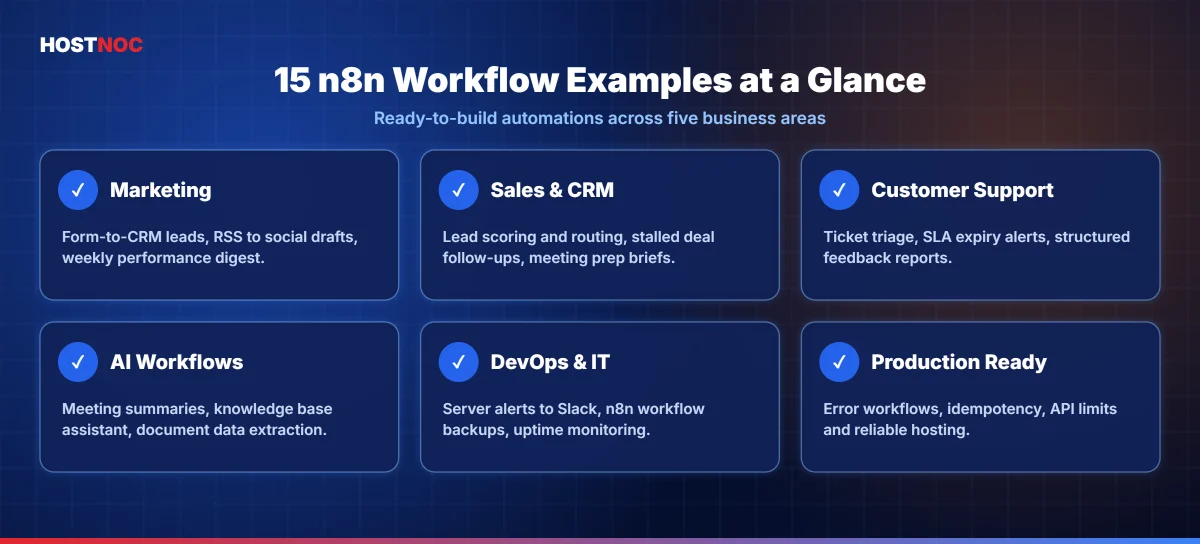
AI Customer Support
Incoming support tickets can automatically trigger ticket categorization, sentiment analysis, knowledge base retrieval, AI-generated responses, CRM updates and agent assignment, all within a single workflow.
Intelligent Lead Qualification
Marketing forms can automatically validate contact details, enrich company profiles, score leads, generate summaries, notify sales reps and schedule follow-ups. This removes manual qualification and speeds up response times.
Content Production Pipelines
Marketing teams automate SEO research, outline creation, article drafting, social media posts, image prompts, publishing and editorial review. HostNOC provides the stable environment these long-running pipelines need.
Internal AI Assistants
Organizations use n8n to build internal assistants that can access:
- Knowledge bases
- Google Workspace and Microsoft 365
- Slack, Notion and Confluence
- Databases and CRMs
- Project management tools
These assistants retrieve information, summarize documents, answer employee questions and automate repetitive tasks. For more department-level ideas, read our guide to n8n workflows for businesses.
Scalability for Growing Automation Needs
AI adoption rarely stays small. Most organizations start with a few workflows and grow to hundreds of automations across departments, and hosting needs grow with them.
Scalable infrastructure lets you increase workflow volume without rebuilding your hosting environment. HostNOC supports this growth with resources that handle higher execution frequency, larger datasets and expanding automation portfolios.
Reliability and High Availability
Business automation often runs around the clock. Examples include:
- Customer onboarding
- Payment processing
- Order synchronization
- Inventory updates
- Support automation
- AI assistants
Interruptions can disrupt operations, delay customer responses or create inconsistent data. Reliable hosting reduces these risks with infrastructure designed for continuous availability. For mission-critical automation, uptime is a core requirement, not a convenience.
Backup and Disaster Recovery
Automation platforms collect valuable operational data, including workflow definitions, execution history, credentials, configuration files and database records. Losing it can mean rebuilding everything from scratch.
HostNOC’s managed environment supports backup strategies that help you recover quickly from unexpected incidents and protect business continuity.
Developer Experience
Developers expect flexibility alongside reliability. HostNOC supports environments where teams can deploy workflows quickly, manage credentials securely, test integrations, scale resources, monitor performance and keep production stable. The result is faster iteration with less infrastructure maintenance.
Monitoring AI Workflow Health
Production automation needs continuous visibility. Key metrics to track include:
- Workflow execution time
- Memory and CPU usage
- Failed executions and error frequency
- API response latency
- Queue length
- Database performance
Monitoring helps you spot bottlenecks before they affect production. HostNOC’s managed approach and server management services simplify this oversight.
Cost Efficiency of Managed Hosting
Self-hosting may look cheaper at first, but hidden costs add up over time:
- Engineering hours
- Server maintenance and security updates
- Downtime recovery
- Monitoring tools
- Infrastructure troubleshooting
- Backup management
Managed hosting turns these responsibilities into one predictable service, often lowering the total cost of ownership for business-critical AI automation. Learn more in the top benefits of managed n8n hosting.
Best Practices for Running AI Automation on n8n
Successful production environments follow a few proven practices:
- Use modular workflows. Smaller workflows are easier to debug and maintain than huge automation chains.
- Store credentials securely. Never embed secrets directly in workflow logic.
- Add retry logic for external APIs to stay resilient during temporary outages.
- Review execution history regularly to find bottlenecks and recurring failures.
- Prune old execution logs to keep the database fast.
- Test in staging first, especially when adding new AI models or third-party services.
Common Mistakes When Hosting AI Workflows
- Undersized servers: AI nodes, large prompts and file processing quickly use up RAM on small plans, causing slow or failed executions.
- No queue mode: Running heavy AI jobs in a single process means one long task can block everything else.
- Missing timeouts and retries: LLM APIs can respond slowly or hit rate limits, so every AI call needs sensible timeouts, retries and fallbacks.
- Skipping backups: Losing the database or encryption key can mean rebuilding workflows and credentials from scratch.
- Exposing the editor publicly: Always protect the n8n editor with strong authentication, HTTPS and IP restrictions where possible.
- Ignoring execution data growth: Prune old executions regularly so the database stays fast as workflow volume grows.
Avoiding these mistakes is a big part of why dedicated n8n hosting for AI automation performs better than a generic shared server.
Why Businesses Choose HostNOC for n8n Hosting
Organizations choose HostNOC because it combines managed infrastructure with the performance AI automation demands:
- ✅ Managed deployment that minimizes setup complexity
- ✅ Infrastructure designed for sustained workflow execution
- ✅ Scalable compute resources for growing automation
- ✅ Reliable uptime for business-critical processes
- ✅ Strong security practices to protect workflow data
- ✅ Professional support for operational issues
By reducing infrastructure overhead, HostNOC lets developers, agencies and enterprises focus on building intelligent automation instead of maintaining servers.
How to Move Your AI Workflows to Managed n8n Hosting
If your AI automations already run on a local machine, a basic VPS or n8n Cloud, moving them to managed n8n hosting is simpler than most teams expect. A planned migration keeps every workflow, credential and execution history intact.
1. Audit Your Current Workflows
List every active workflow, the AI services it calls, how often it runs and which workflows are business-critical. This helps you size CPU, memory and storage correctly from day one.
2. Export Workflows and Credentials Safely
Export workflows as JSON and back up your database and encryption key. Without the original encryption key, saved credentials cannot be decrypted on the new server.
3. Choose the Right Server Plan
AI workloads with large prompts, document processing or vector database lookups need more RAM and faster storage than simple integrations. Choose a plan with headroom so traffic spikes do not slow down executions.
4. Import, Test and Switch Over
Import your workflows, reconnect credentials and run each critical workflow with test data. Update webhook URLs in connected apps, then switch production traffic once results match your old environment.
5. Monitor the First Weeks Closely
Watch execution times, failed runs, API rate limits and resource usage during the first weeks. Fine-tune concurrency, queue mode and timeouts based on real usage.
With HostNOC, our team can help plan this migration so your n8n hosting for AI automation is production-ready without long downtime or lost data.
Conclusion
AI automation has moved beyond experimentation. Businesses now rely on automated workflows to manage customer interactions, process documents, orchestrate AI agents, sync enterprise apps and speed up decisions. As workflows grow more sophisticated, hosting plays a bigger role in consistent execution, scalability and security.
HostNOC’s managed n8n hosting removes the operational headaches of self-managed deployments with a stable, scalable environment optimized for AI automation. Your engineers design workflows that deliver business value instead of maintaining infrastructure.
For companies investing in AI automation, choosing hosting built for production workloads is a strategic decision for long-term reliability, performance and growth.
Ready to Power Your AI Workflows?
Get managed n8n hosting from HostNOC and launch reliable, scalable AI automation without the server headaches.
FAQs
n8n Hosting for AI Automation: Frequently Asked Questions
Quick answers to the questions people ask most.
Why is managed n8n hosting better than self-hosting for AI automation?
Managed hosting removes the need to maintain servers, configure security, apply updates and monitor infrastructure. Your team focuses on building AI workflows while benefiting from better reliability, scalability and operational support.
Can HostNOC’s n8n hosting handle complex AI workflows?
Yes. AI workflows often involve multiple APIs, large datasets, vector databases and long-running processes. A managed environment with enough CPU, memory, fast NVMe storage and reliable networking is built for these production workloads.
What types of AI automations can run on n8n?
Common use cases include AI customer support, document processing, CRM automation, lead enrichment, content generation, Retrieval-Augmented Generation (RAG), AI agents, workflow orchestration and enterprise system integrations.
Is security important for n8n AI automation?
Absolutely. AI workflows frequently process confidential business data, customer information and internal documents. Secure hosting with encryption, controlled access, backups and server hardening helps protect that information.
How does hosting impact n8n workflow performance?
Hosting affects execution speed, concurrency, API response times, database performance and overall reliability. Adequate CPU, sufficient RAM, NVMe storage and stable networking reduce failures and speed up AI workflows.

Featured Post
20 Best Free n8n Templates (By Use Case)
Discover 20 free n8n templates by use case, from AI email triage...

n8n vs Make.com: Which Automation Platform Is Better?
n8n vs Make.com compared on ease of use, flexibility, integrations, AI automation,...
n8n vs Zapier: Which One Should You Choose and Why?
n8n vs Zapier compared on ease of use, integrations, AI automation, pricing,...
Follow us on:


Get the Latest News & Deals
Sign up to receive the latest news, updates and special offers from HostNOC.
I'd like to receive: