


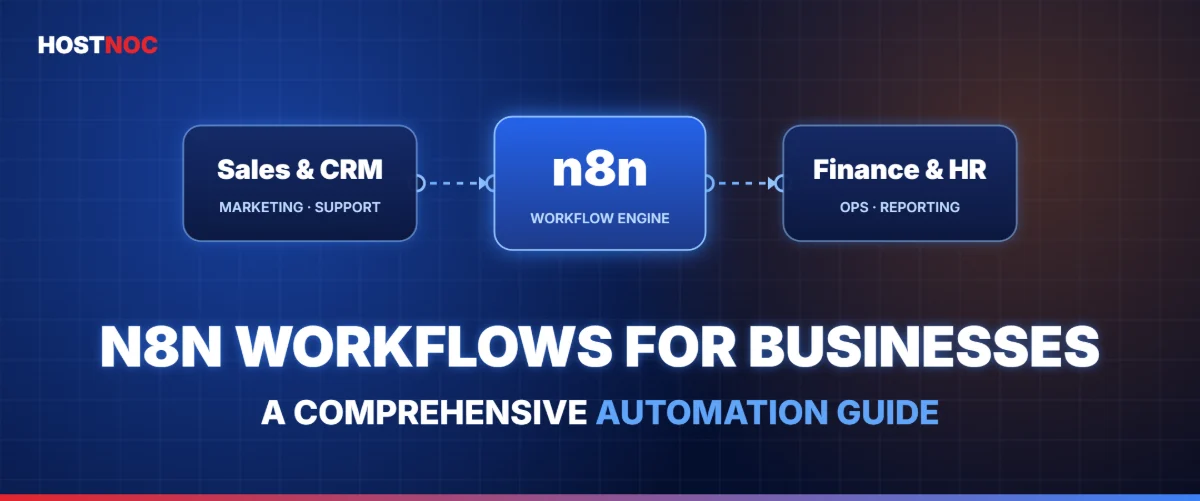
n8n workflows help businesses connect the dozens of software platforms they run on every day. Customer data lives in Salesforce, invoices are generated in QuickBooks, campaigns run through HubSpot, support tickets arrive in Zendesk and teams talk in Slack or Microsoft Teams. As a result, employees spend countless hours copying information from one app to another.
🔑 Key Takeaways
- Businesses can automate repetitive tasks across CRM, ERP, marketing, finance, HR, customer support and operations.
- Unlike many automation platforms, n8n offers both self-hosted and cloud deployment, giving you more control over security and data.
- n8n supports hundreds of integrations and connects almost any software through REST APIs, webhooks, GraphQL, JavaScript and custom nodes.
- AI-powered workflows bring OpenAI, Anthropic, Google Gemini, vector databases and RAG systems into everyday business processes.
- Workflow automation reduces manual work, improves accuracy, speeds up response times and lowers costs.
- Good workflow design, error handling, monitoring and documentation are essential for reliable automation.
The problem is not a lack of software. The real issue is that these systems rarely talk to each other efficiently. Teams waste time on repetitive admin work instead of strategic projects, and manual processes add delays, inconsistencies and costly human errors.
This is where n8n workflows transform business operations. By automating repetitive tasks, moving data between systems and adding AI capabilities, n8n lets you build sophisticated processes without custom software for every need.
Whether you run a startup, SaaS company, ecommerce brand, healthcare provider, financial firm or enterprise, n8n can become the automation layer that connects every part of your business.
☰ Table of Contents (click to expand)
How Do n8n Business Workflows Work?
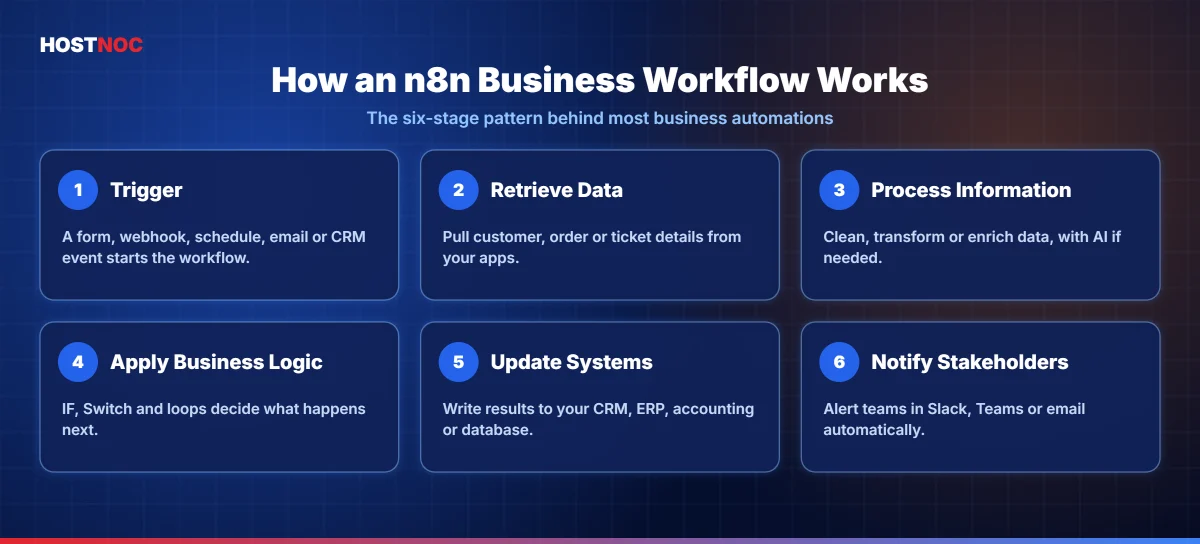
The core value of n8n is simple: it automates multi-step business processes across different software systems. A typical workflow follows this sequence:
Trigger → Retrieve Data → Process Information → Apply Business Logic → Update Systems → Notify Stakeholders
For example, here is what happens automatically when a customer buys a product:
- Customer purchases a product
- Shopify sends a webhook
- n8n retrieves customer information
- Creates an invoice in QuickBooks
- Updates the Salesforce CRM
- Sends a Slack notification
- Adds the customer to a HubSpot email campaign
- Creates a shipping label
- Emails tracking information
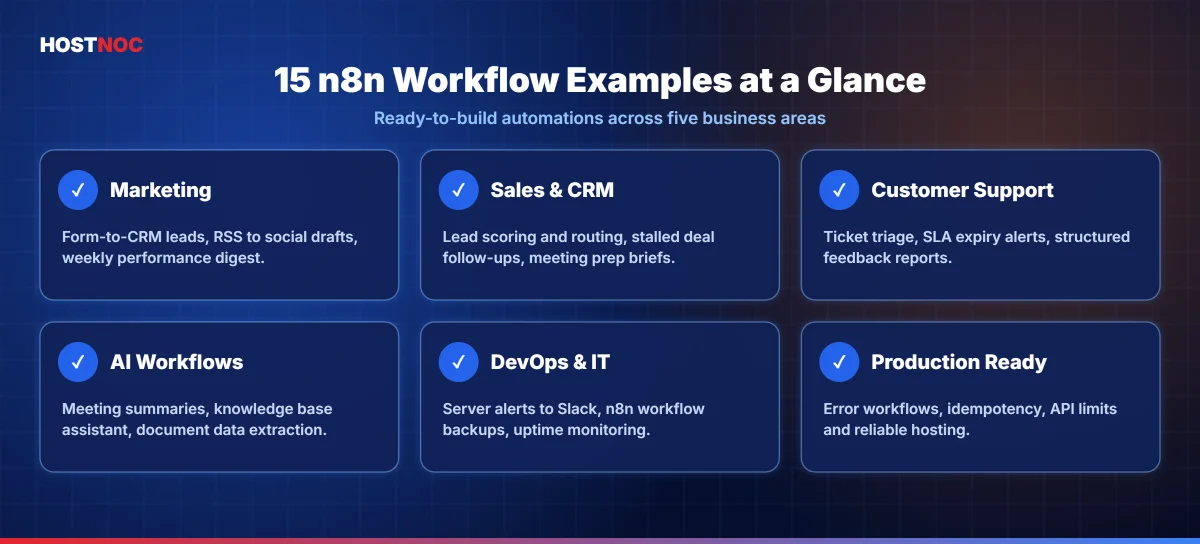
Instead of employees handling each of these tasks separately, the workflow completes everything automatically. Want ready-to-build ideas? See our 15 n8n workflow examples.
Core Components of n8n Workflows
Triggers
Every workflow starts with a trigger, which decides when the automation runs. Common triggers include:
- Webhooks and API calls
- Form submissions
- Scheduled jobs
- Email received
- Database updates
- CRM events
- File uploads
- Manual execution
Nodes
Nodes are the building blocks of every workflow, and each node performs one specific task. Examples include HTTP Request, PostgreSQL, MySQL, Airtable, Notion, Google Sheets, Gmail, Slack, Discord, OpenAI, Anthropic, Microsoft Outlook, Salesforce, HubSpot, Shopify and Stripe.
Logic
Business automation needs smart decision-making. n8n supports:
- If statements and switch conditions
- Loops and merge operations
- Wait nodes and retry logic
- Expressions and variables
- Data transformation
This lets n8n workflows behave differently depending on the incoming data.
Error Handling
Reliable automation needs resilience. n8n supports automatic retries, error workflows, notifications, logging, fallback actions and conditional recovery, so one failure does not disrupt operations. Learn more in the official n8n error handling documentation.
HostNOC Tip: Create one shared error workflow and attach it to every business-critical automation. It should alert your team in Slack or email with the workflow name, failed node and execution link.
Business Use Cases for n8n
Sales Automation
Sales teams constantly switch between CRMs, calendars, email, proposal tools and chat apps. n8n automates these repetitive steps. Example workflow:
- Website form submission
- Lead qualification
- Create contact in Salesforce
- Assign a sales representative
- Schedule a follow-up task
- Notify a Slack channel
- Send a welcome email
- Update the analytics dashboard
Sales reps spend more time selling and less time on admin work.
Marketing Automation
Marketing teams rely on many platforms, and n8n connects them, including HubSpot, Mailchimp, ActiveCampaign, Meta Ads, Google Ads, Google Analytics, LinkedIn, WordPress and Airtable. Example workflow:
- New blog post published
- Generate an AI summary
- Create a LinkedIn post
- Generate X (Twitter) content
- Email newsletter subscribers
- Update the RSS feed
- Track engagement
One publishing action automatically updates every marketing channel.
Customer Support
Support teams manage conversations across Zendesk, Freshdesk, Intercom, Slack, Gmail, OpenAI and Notion. Example automation:
- Support ticket created
- Analyze urgency
- Detect customer tier
- Assign the correct department
- Generate an AI draft response
- Notify the support manager
- Update the CRM
- Create a knowledge base suggestion
Customer response times improve significantly.
Finance Automation
Finance teams spend a lot of time on repetitive bookkeeping. n8n can automate invoice generation, payment reconciliation, accounting updates, expense categorization, approval routing, executive reporting and monthly summaries. It integrates with QuickBooks, Xero, Stripe, PayPal, Wise and ERP systems.
Human Resources
HR teams automate the employee lifecycle, including onboarding, account creation, email provisioning, equipment requests, training enrollment, payroll registration and manager notifications. This cuts onboarding time from hours to minutes.
Run Your Business Workflows on Reliable n8n Hosting
Host n8n on fast, secure HostNOC servers with full root access, NVMe storage and 24/7 expert support.
AI-Powered n8n Workflows
AI has become one of n8n’s strongest capabilities. Businesses use AI models inside n8n workflows for:
- Document summarization and contract analysis
- Email drafting and content generation
- Customer support and sentiment analysis
- Data extraction
- Lead qualification
- Meeting summaries
- Translation
AI workflows are heavier than standard automations, so hosting matters. Learn why in our guide to n8n hosting for AI automation.
AI becomes truly useful when it is part of a larger business workflow, not a standalone chatbot.
Common Business Integrations
You can browse every supported app in the n8n integrations library.
Most organizations already use many software platforms. n8n commonly integrates with:
| Category | Common Tools |
|---|---|
| CRM | Salesforce, HubSpot, Pipedrive, Zoho CRM |
| Communication | Slack, Microsoft Teams, Gmail, Outlook, Discord |
| Databases | PostgreSQL, MySQL, MongoDB, Redis, Supabase |
| Productivity | Google Workspace, Microsoft 365, Notion, Airtable, Trello, Asana |
| Ecommerce | Shopify, WooCommerce, Stripe, PayPal |
| Cloud Services | AWS, Azure, Google Cloud, DigitalOcean |
| Development | GitHub, GitLab, Docker, Jenkins |
| Analytics | Google Analytics, BigQuery, Snowflake, Looker Studio |
Benefits of n8n for Businesses
Reduced Operational Costs
Automation removes thousands of repetitive manual tasks every month. Instead of hiring more admin staff, you automate routine work and let employees focus on higher-value activities.
Improved Accuracy
Manual data entry leads to mistakes. Automated n8n workflows follow predefined rules every time, reducing duplicate records, missing information and sync issues.
Faster Business Processes
Processes that took hours can often finish in seconds. This improves customer satisfaction, sales response times, internal collaboration, financial reporting and employee productivity.
Better Data Consistency
n8n keeps information in sync across platforms, so customer data, invoices, support history and marketing data stay aligned.
Scalability
Manual work grows with your business. Automation does not. Whether you process 100 or 100,000 customers, the workflow stays consistent.
Best Practices for Building n8n Workflows
Successful automation needs thoughtful planning. Follow these best practices:
- Document the process first. Map every step, decision point and dependency before you automate it.
- Build modular n8n workflows. Smaller workflows are easier to maintain, troubleshoot and extend than one huge automation.
- Handle errors properly. Plan for API failures, invalid inputs, authentication issues and outages. Add retries and alert the right people when manual action is needed.
- Use clear names. Descriptive names for n8n workflows, nodes and variables help current and future team members.
- Separate environments. Keep development, staging and production apart for business-critical automations.
- Document every workflow. Record its purpose, triggers, dependencies, inputs, outputs and owner.
- Monitor performance. Track runtime, failure rates, throughput and API usage to find bottlenecks early.
Security Considerations
Treat workflow automation as part of your wider security strategy:
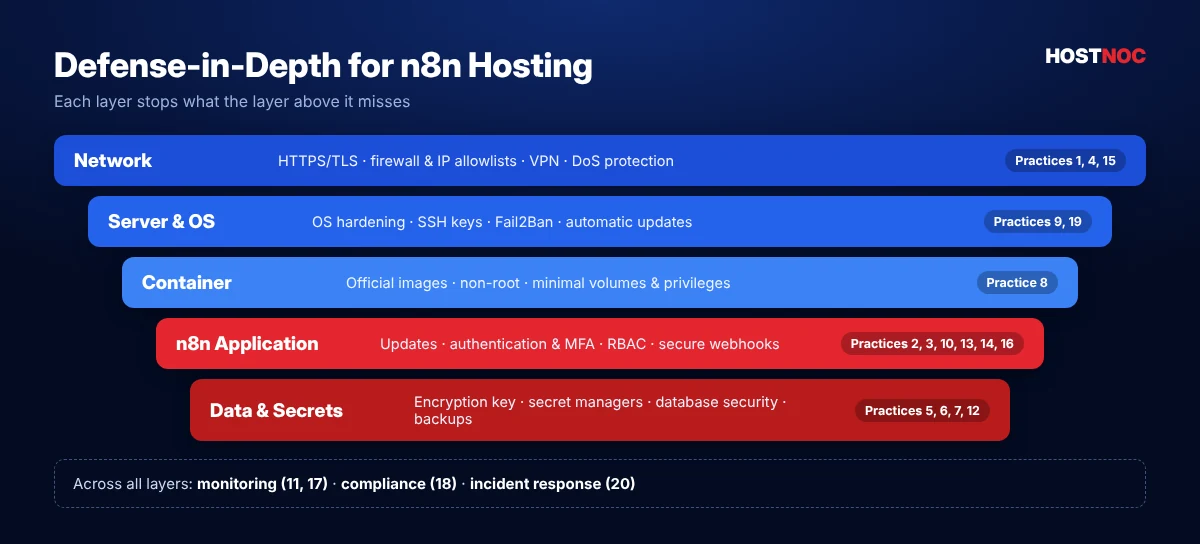
- Use secure credential management instead of hard-coding API keys in n8n workflows.
- Follow the principle of least privilege so n8n workflows only access what they need.
- Encrypt sensitive data in transit and at rest.
- Enable audit logging and review credentials regularly.
- On self-hosted deployments, apply security updates promptly and test backups periodically.
- Consider compliance requirements such as GDPR, HIPAA, SOC 2 or ISO 27001 for regulated data.
If you self-host, you are responsible for all of this. Compare your options in self-hosted vs cloud n8n, or let a managed provider handle it. See the benefits of managed n8n hosting.
Is n8n Suitable for Every Business?
n8n is most valuable for organizations that use many software applications and repeat the same processes often. Technology companies, ecommerce businesses, digital agencies, healthcare providers, financial firms, educational institutions and manufacturers can all benefit.
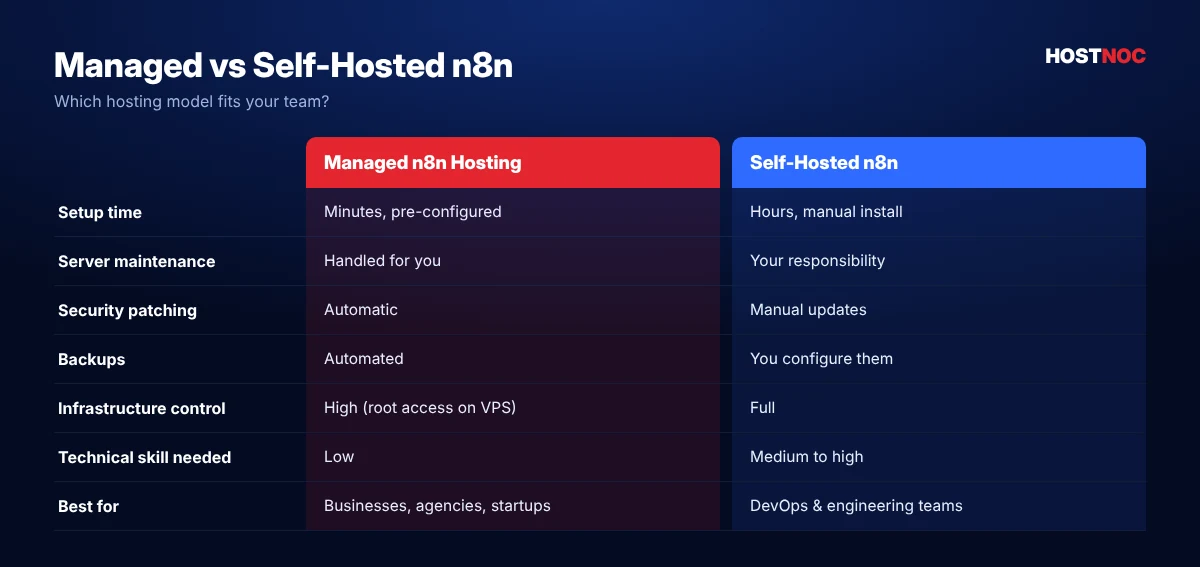
Smaller businesses like its affordability and easy customization. Larger enterprises value its extensibility, self-hosting options and ability to integrate proprietary systems. It is especially strong for teams that want more control than typical no-code tools offer, without building every integration from scratch. Comparing tools? Read n8n vs Zapier and n8n vs Make.com.
How to Build Your First n8n Workflow for Your Business
The fastest way to see value from n8n workflows is to start with one small, high-impact process. Follow these steps to move from idea to a reliable production automation.
1. Pick a Repetitive, Rule-Based Task
Look for work your team repeats every day or week and that follows clear rules. Good first candidates include copying web form leads into your CRM, sending invoice reminders, creating support tickets from emails or posting daily sales summaries in Slack. Avoid processes that depend on judgement calls until you are comfortable with the platform.
2. Map the Process Before You Build
Write down the trigger, every system involved, the data that moves between them and the expected result. A simple diagram helps you spot missing steps, duplicate data entry and approval points before you open the editor. This planning step saves hours of rework later.
3. Choose the Right Trigger
Decide what starts the workflow. Webhooks work best for real-time events such as form submissions or payments. Schedule triggers suit reports and data syncs. App triggers react to changes in tools like Google Sheets, HubSpot or Shopify.
4. Add Nodes, Logic and Data Mapping
Connect the apps you need, map fields carefully and use IF, Switch and Merge nodes to handle different scenarios. Keep each workflow focused on a single job. If a process grows too large, split it into sub-workflows that are easier to test and reuse.
5. Test With Real Sample Data
Run the workflow manually with realistic records, including edge cases such as empty fields, duplicate contacts and failed API calls. Check every output in the destination system before you switch the workflow on.
6. Activate, Monitor and Improve
Once it works, activate it and attach an error workflow so your team is alerted when something breaks. Review execution logs each week during the first month, then refine filters, timing and notifications based on what you learn.
How to Measure the ROI of n8n Workflows
Automation should deliver measurable results. Tracking a few simple metrics helps you prove the value of n8n workflows and decide what to automate next.
- Hours saved: Multiply how long the manual task took by how often it ran each month.
- Error reduction: Compare data entry mistakes, missed follow-ups or duplicate records before and after automation.
- Response time: Measure how quickly leads, tickets or approvals are handled once the workflow is live.
- Cost per process: Compare staff time and software costs with your n8n hosting and maintenance costs.
- Revenue impact: Track faster lead follow-up, fewer abandoned orders and improved customer retention.
For example, if a sales coordinator spends 30 minutes a day copying leads between tools, automating that single task frees more than 10 hours every month. Multiply that across sales, support, finance and HR, and the savings grow quickly. Because self-hosted n8n does not charge per task in the same way many SaaS automation tools do, the return usually improves as your workflow volume increases.
Start with one or two workflows, measure the results for 30 days and share the numbers with stakeholders. Clear data makes it much easier to win support for wider automation across the business.
Common Mistakes to Avoid With n8n Workflows
- Automating a broken process: Fix unclear steps first, because n8n workflows will only repeat the same problems faster.
- Skipping documentation: Add notes to complex n8n workflows so other team members can understand and maintain them.
- Ignoring error alerts: Silent failures can leave leads, invoices or tickets unprocessed for days.
- Running production on weak hosting: Business-critical n8n workflows need stable CPU, memory, backups and uptime monitoring.
- Giving every workflow full access: Limit credentials and permissions to only what each automation needs.
Conclusion
n8n has grown from a workflow automation tool into a complete business orchestration platform. By connecting apps, APIs, databases and AI services, it automates complex processes across departments and systems.
When implemented thoughtfully, n8n workflows reduce manual effort, improve accuracy, speed up customer service and create a scalable base for digital transformation. As businesses adopt more AI and connected software, n8n gives you the flexibility to adapt quickly while keeping control of your data and automation logic.
Ready to Automate Your Business With n8n?
Launch n8n on HostNOC hosting and get the performance, security and support your n8n workflows need.
FAQs
n8n Workflows for Businesses: Frequently Asked Questions
Quick answers to the questions people ask most.
What is n8n used for in business?
n8n automates business processes by connecting applications, APIs, databases and cloud services. Common uses include sales automation, marketing campaigns, customer support, finance, HR and AI-powered workflows.
Is n8n better than Zapier?
It depends on your needs. n8n offers more flexibility, custom logic, JavaScript support, self-hosting and advanced customization. Zapier has a gentler learning curve and a larger catalog of prebuilt integrations. See our full n8n vs Zapier comparison.
Can n8n integrate with AI models?
Yes. n8n integrates with AI providers such as OpenAI, Anthropic, Google Gemini and self-hosted models for summarization, classification, content generation and intelligent customer support.
Can non-developers use n8n?
Yes. Many n8n workflows can be built with the visual editor and prebuilt nodes. Advanced automations may benefit from JavaScript, API knowledge or familiarity with data structures.
Is n8n secure for enterprise use?
Yes, when configured properly. Use secure credential storage, role-based access control, encryption, logging, backups and regular updates. Self-hosting also gives more control over data residency and compliance.
What types of businesses benefit most from n8n?
Organizations with repetitive, cross-functional processes, such as SaaS companies, ecommerce retailers, agencies, healthcare providers, financial institutions and enterprise IT teams, often see the biggest return.
Does n8n require coding?
Basic n8n workflows can be created without coding. JavaScript, REST APIs, SQL and custom expressions extend n8n for advanced business scenarios.
What are the biggest advantages of self-hosting n8n?
Self-hosting gives more control over infrastructure, data privacy, compliance, customization and deployment. It can also be more cost-effective for high workflow volumes.

Featured Post

7 IT Priorities for 2027
Information technology is entering a period in which simply maintaining systems is...

n8n Docker Installation Guide: Complete Step-by-Step Setup for Beginners and Production
Step-by-step n8n Docker installation guide covering Docker Compose, PostgreSQL, HTTPS, environment variables,...

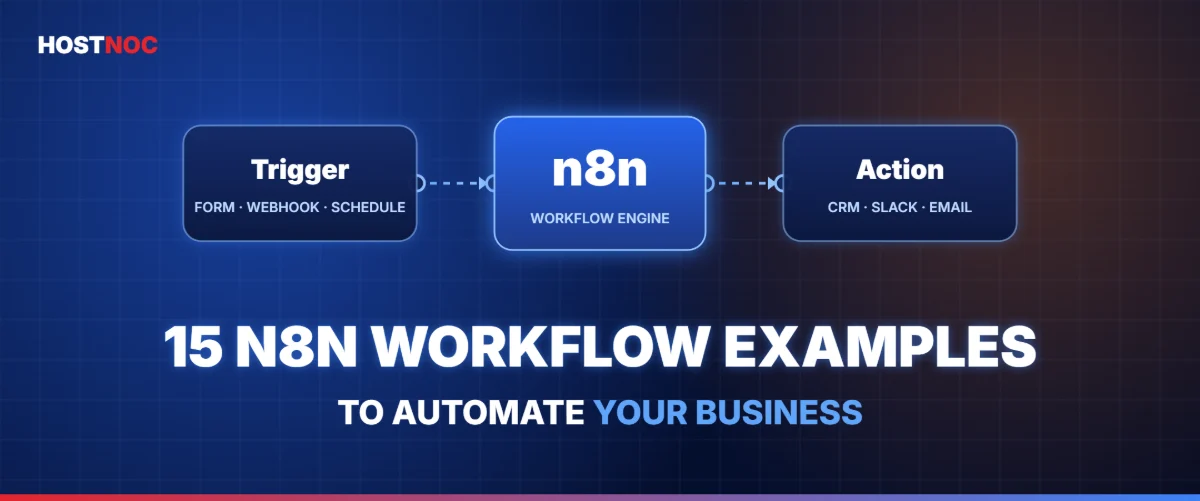

15 n8n Workflow Examples to Automate Your Business
Real n8n workflow examples for marketing, sales, support, AI and DevOps, with...
Follow us on:


Get the Latest News & Deals
Sign up to receive the latest news, updates and special offers from HostNOC.
I'd like to receive: