


Server Configuration: The Only Guide You Will Ever Need
Whether you are setting up a server for a personal project or managing servers for a large organization, understanding how to properly configure your server can enhance security, optimize performance, and ensure reliability. This comprehensive guide by HOSTNOC will walk you through the essential steps and best practices for server configuration, ensuring you have all the knowledge needed to get started.
Server configuration is the process of setting up a server’s operating system, software, network and security settings so it can perform a specific role, such as a web, database or application server, securely and efficiently. Proper server configuration improves security, performance and reliability from day one.
🔑 Key Takeaways
- Start by defining the server role, then choose Linux or Windows Server based on your application stack.
- Initial setup covers system updates, hostname, network settings, disk partitioning and SSH or RDP access.
- Secure the server with a firewall, Fail2Ban, strong authentication, MFA and by disabling unused services.
- Optimize CPU, memory, swap, disk I/O and caching, then install the web, database or application role.
- Keep it healthy with monitoring, automated backups, log management and a plan for scaling.
Whether you are setting up a server for a personal project or managing servers for a large organization, the steps below help you build a secure, fast and reliable server.
This guide by HOSTNOC walks you through the essential server configuration steps and best practices in a clear, practical order.
☰ Table of Contents (click to expand)
- What Is Server Configuration?
- What Are the Steps to Configure a Server?
- How Do You Choose the Right Server Operating System?
- What Should You Do During Initial Server Setup?
- How Do You Secure a Server Configuration?
- How Do You Optimize Server Performance?
- How Do You Configure Server Roles and Applications?
- How Do You Monitor and Maintain a Configured Server?
- How Do You Scale a Server as Demand Grows?
- Conclusion
- Server Configuration: Frequently Asked Questions
What Is Server Configuration?
Server configuration means setting up a server’s hardware and software so it performs a defined role. It includes choosing the operating system, installing software, configuring networking and applying security controls to meet your application’s needs.
Common server roles include:
- Web servers: serve websites and web applications to users.
- Database servers: store and manage databases (see dedicated servers for SQL databases).
- File servers: provide central file storage and sharing.
- Mail servers: send and receive email (learn how to set up email hosting on your own server).
- Application servers: host applications and their business logic.
What Are the Steps to Configure a Server?
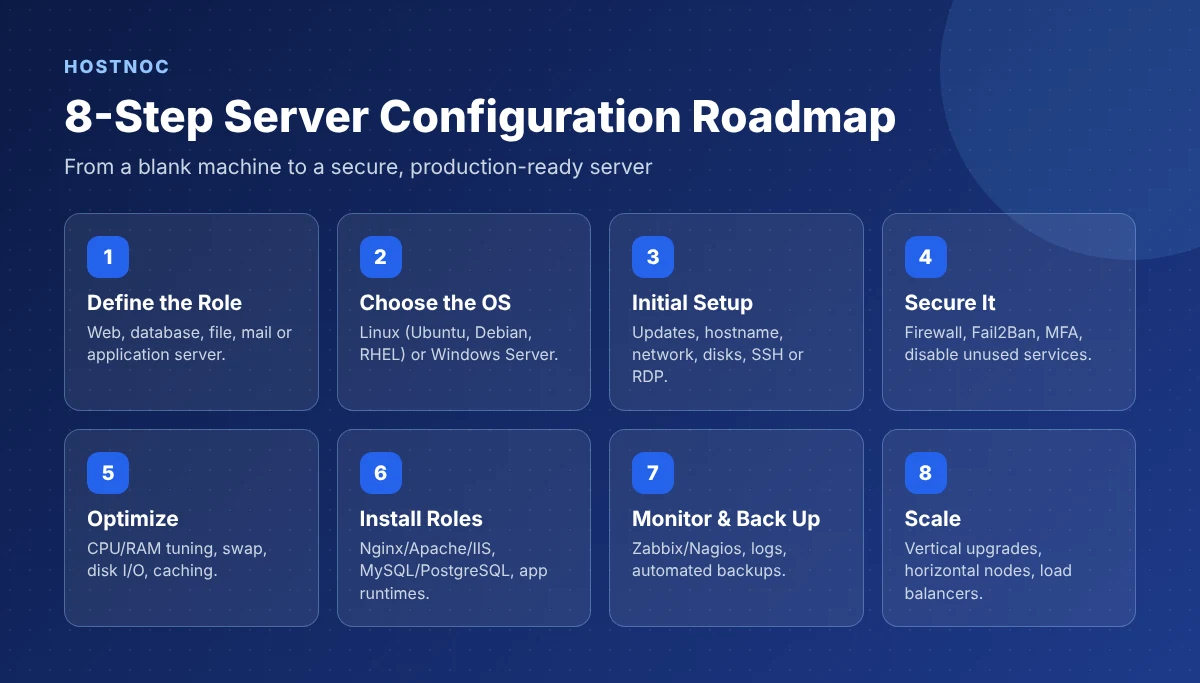
The eight steps to configure a server are: define its role, choose the operating system, complete the initial setup, secure it, optimize performance, install server roles, set up monitoring and backups, and plan for scaling.
How Do You Choose the Right Server Operating System?
Choose Linux if you run open-source stacks like PHP, Python, Node.js or Docker and want no licence cost. Choose Windows Server if you depend on .NET, Microsoft SQL Server, Active Directory or other Microsoft products.
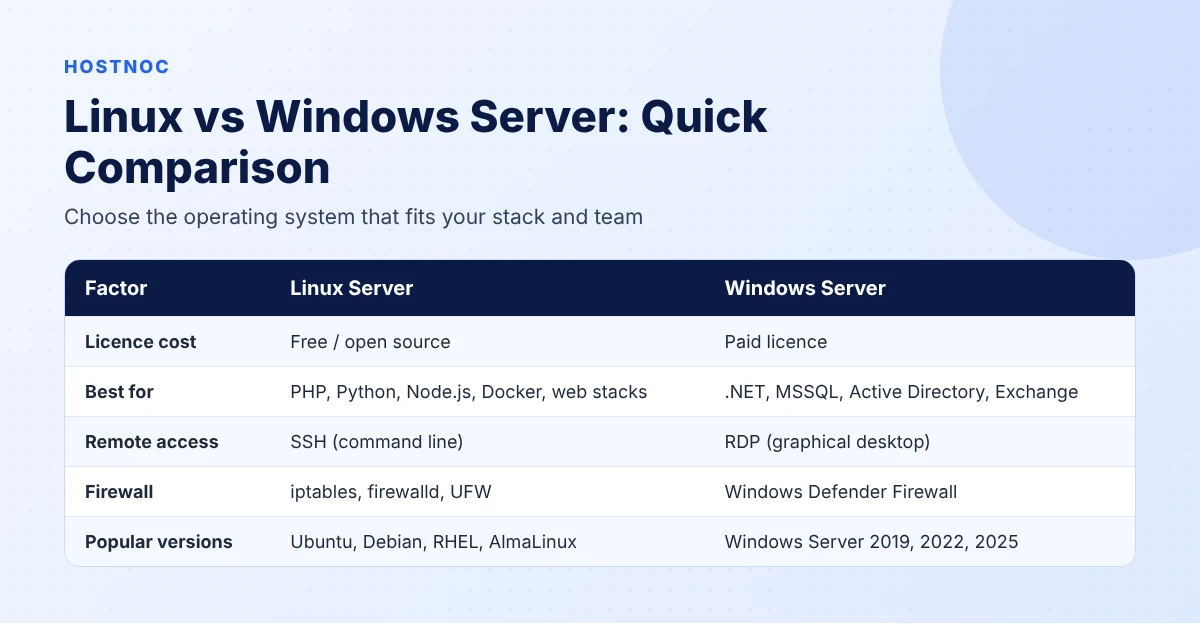
| Factor | Linux Server | Windows Server |
|---|---|---|
| Cost | Free, open source | Paid licence |
| Strengths | Highly customizable, strong permissions model, fewer targeted attacks | Microsoft integration, familiar interface, strong .NET support |
| Popular versions | Ubuntu Server, Debian, RHEL, AlmaLinux, Fedora | Windows Server 2019, 2022, 2025 |
| Remote access | SSH | Remote Desktop (RDP) |
When choosing, check three things: compatibility with your applications, built-in security features and the community and vendor support available. For a deeper comparison, read Windows VPS vs Linux VPS hosting.
Get a Server With Your Preferred OS Pre-Installed
Choose Linux or Windows dedicated servers with full root or admin access, NVMe storage and 24/7 support.
What Should You Do During Initial Server Setup?
During initial setup, update all packages, set a unique hostname, configure network settings, partition the disks and enable secure remote access with SSH on Linux or RDP on Windows.
- Update the system: use
apton Ubuntu/Debian,dnforyumon RHEL-based systems, or Windows Update. - Configure the hostname: set a unique name to identify the server for DNS and management.
- Set up networking: configure the IP address, subnet mask, gateway and DNS servers, and decide between a static or dynamic IP.
- Partition and format disks: use
fdiskorpartedon Linux, or Disk Management on Windows. - Enable SSH (Linux): install it with
sudo apt install openssh-serverand use key-based login. - Enable Remote Desktop (Windows): restrict RDP to specific IP addresses and use strong authentication. Need a ready system? Try an RDP server.
How Do You Secure a Server Configuration?
Secure a server by enabling a firewall, disabling unnecessary services and ports, blocking brute-force attacks with Fail2Ban or firewall rules, enforcing strong passwords with MFA and patching regularly.
- Firewall: use
iptables,firewalldor UFW on Linux, and Windows Defender Firewall on Windows. - Disable unused services: close every port and service your server does not need.
- Block brute-force attacks: Fail2Ban bans IPs that show malicious behavior.
- Strong authentication: enforce strong passwords and multi-factor authentication (MFA).
- Patch regularly: keep the OS and software up to date.
For a complete checklist, follow our server hardening guide.
How Do You Optimize Server Performance?
Optimize server performance by monitoring CPU and memory usage, configuring swap space, tuning disk I/O and adding caching with tools like Redis or Memcached.
- CPU and memory: monitor with
top,htopor Task Manager and allocate resources to match the server’s role. - Swap space: configure swap as overflow for RAM to prevent crashes.
- Disk I/O: monitor with
iostatand upgrade to NVMe storage if disks are a bottleneck. - Caching: use Redis or Memcached to reduce database load and speed up responses.
How Do You Configure Server Roles and Applications?
After securing and optimizing the server, install the software for its role: a web server, a database server or an application server.
| Role | Software | Key Configuration |
|---|---|---|
| Web server | Nginx, Apache, IIS | Virtual hosts for multiple domains, SSL/TLS encryption |
| Database server | MySQL, PostgreSQL, Microsoft SQL Server | Strong user roles, regular backups, replication for high availability |
| Application server | Tomcat, JBoss, Node.js, .NET | Correct runtime versions (Java, Python, .NET) and environment settings |
Running automation tools? See how to install n8n on a VPS as a real-world example.
Need a Fast, Configurable VPS?
Launch a Linux or Windows VPS with full root access in minutes and configure it exactly the way you want.
How Do You Monitor and Maintain a Configured Server?
Monitor server health with tools like Nagios or Zabbix, automate backups, review logs regularly and schedule routine tasks with cron jobs or Task Scheduler.
- Health monitoring: track CPU, memory, disk space and network traffic. See server monitoring.
- Backups: back up data and configurations with
rsyncor Windows Server Backup. Read data backup and recovery. - Log management: review logs for unusual activity and centralize them for easier analysis.
- Automation: schedule updates, backups and log rotation with cron (Linux) or Task Scheduler (Windows).
These ongoing tasks are covered in detail in our server maintenance guide.
How Do You Scale a Server as Demand Grows?
Scale a server vertically by adding CPU, RAM and storage, or horizontally by adding more servers behind a load balancer such as HAProxy or AWS ELB.
| Method | How It Works | Limitation |
|---|---|---|
| Vertical scaling | Upgrade CPU, RAM, storage and bandwidth on one server | Hardware limits and rising cost |
| Horizontal scaling | Add servers and spread traffic with a load balancer | More complex to manage |
Learn more in our guide to server load balancing and how it fits into your overall server architecture.
Conclusion
Server configuration takes careful planning, from choosing the operating system to securing, optimizing, monitoring and scaling the server. Follow these steps and your server will be stable, secure and ready for production.
Prefer to skip the setup? HOSTNOC server management can configure and maintain your servers for you.
FAQs
Server Configuration: Frequently Asked Questions
Quick answers to the questions people ask most.
What is server configuration?
Server configuration is the process of setting up a server’s operating system, software, network and security settings so it can perform a specific role securely and efficiently.
What are the basic steps of server configuration?
Define the server role, choose the operating system, complete initial setup, secure the server, optimize performance, install server roles, set up monitoring and backups, and plan for scaling.
Which is better for servers, Linux or Windows?
Linux is better for open-source stacks and has no licence cost, while Windows Server is better for .NET, Microsoft SQL Server and Active Directory environments.
How do I secure a new server?
Update all packages, enable a firewall, disable unused services, use SSH keys or restricted RDP, install Fail2Ban, enforce MFA and patch regularly.
What tools are used to monitor server configuration?
Common tools include Nagios, Zabbix, htop, iostat and Windows Performance Monitor.
What is the difference between vertical and horizontal scaling?
Vertical scaling adds more resources to one server, while horizontal scaling adds more servers and spreads traffic across them with a load balancer.

Muhammad Osama
Featured Post
n8n Docker Installation Guide: Complete Step-by-Step Setup for Beginners and Production
Step-by-step n8n Docker installation guide covering Docker Compose, PostgreSQL, HTTPS, environment variables,...

15 n8n Workflow Examples to Automate Your Business
Real n8n workflow examples for marketing, sales, support, AI and DevOps, with...
n8n Workflows for Businesses: A Comprehensive Guide
A complete guide to n8n workflows for businesses: how they work, core...
Follow us on:


Get the Latest News & Deals
Sign up to receive the latest news, updates and special offers from HostNOC.
I'd like to receive: